Handyman software for solo pros and teams of 1-10

Handyman business software for jobs, schedules, and invoices

Handyman business software for customer requests, multi-task jobs, scheduling, field notes, estimates, and invoices. Start with a free plan.

Reviewed · By Nick Petrus

  • 50 one-time AI credits
  • No credit card
  • One connected workspace

Built for repair lists, installations, turnover work, small projects, return visits, and repeat customers.

Plain-language definition

What is Handyman business software?

Handyman business software connects the customer, service address, requested task list, appointment, assigned person, field notes, estimate, approved changes, and invoice. It helps a solo operator or small team manage varied work without treating every task as the same trade or scope.

Where the day gets messy

The information gaps behind everyday Handyman work

These are coordination problems, not abstract software problems. Each one becomes easier when the call, job, calendar, and customer documents share a record.

One request contains several different tasks

A customer may describe repairs, mounting, painting, trim, assembly, and a possible specialty-trade issue in the same conversation. The business needs a clear task list, questions, photos, access notes, and exclusions before committing to a visit.

Small jobs are easy to under-schedule

Travel, setup, material pickup, hidden conditions, and customer-added tasks can turn a short appointment into a half day. The scheduler needs the current scope and enough time rather than a calendar title alone.

Extra work appears after arrival

The customer may add another item or the inspected condition may differ from the description. The team needs to document the change, price or defer it, obtain approval, and keep the invoice aligned with the agreed work.

Notes and photos stay on personal phones

Before-and-after photos, measurements, material notes, and access details become difficult to find when they are scattered across texts and camera rolls. A job record gives the office and field user a shared history.

Repeat customers expect the previous context

A homeowner, landlord, or property manager often returns with a new list. The business should retrieve the correct address, earlier work, documents, and open follow-up without rebuilding the relationship from memory.

One connected record

Call → Job → Schedule → Estimate → Invoice

A connected handyman workflow keeps the request, task list, appointment, field record, estimate, changes, and invoice together. The business still decides scope, duration, qualifications, materials, permits, safety, and final pricing.

  1. Call

    Capture every requested task and open question

    Record the customer, property, access details, task list, photos or measurements supplied, preferred time, and any request that requires human review. Configured AI phone intake can follow approved questions and escalation rules.

    In this workflow: Door adjustment, shelf mounting, drywall review, parking instructions, and two customer photos.

  2. Job

    Create one scoped record for the visit

    Keep the task list, customer description, internal questions, attachments, history, and proposed next action on one job. Separate confirmed work from items that require inspection or a specialist.

    In this workflow: Two tasks ready to estimate; drywall extent to be confirmed on site; electrical request excluded and referred.

  3. Schedule

    Assign enough time and the right person

    Review location, access, expected duration, tools, materials, skill requirements, existing commitments, and travel before assigning the appointment. A person remains responsible for the final schedule decision.

    In this workflow: A three-hour window assigned after confirming the task list and travel from the previous job.

  4. Estimate

    Price the inspected scope task by task

    Prepare clear labor and material line items, assumptions, exclusions, taxes, minimum or travel charges, and the approval path. Record additional work as a reviewed change instead of silently adding it later.

    In this workflow: Door and shelf work priced; drywall repair described with an inspected area and finish exclusion.

  5. Invoice

    Match billing to completed and approved work

    Review the completed task notes, materials, approved changes, estimate, and applicable payment status before sending the invoice. Keep the record available for the next request at the property.

    In this workflow: Completed items, deferred item, approved change, invoice, and payment status in the same customer history.

Try the workflow with a real job.The free plan does not require payment details.
Start free

See the current Fixlify mobile job workflow

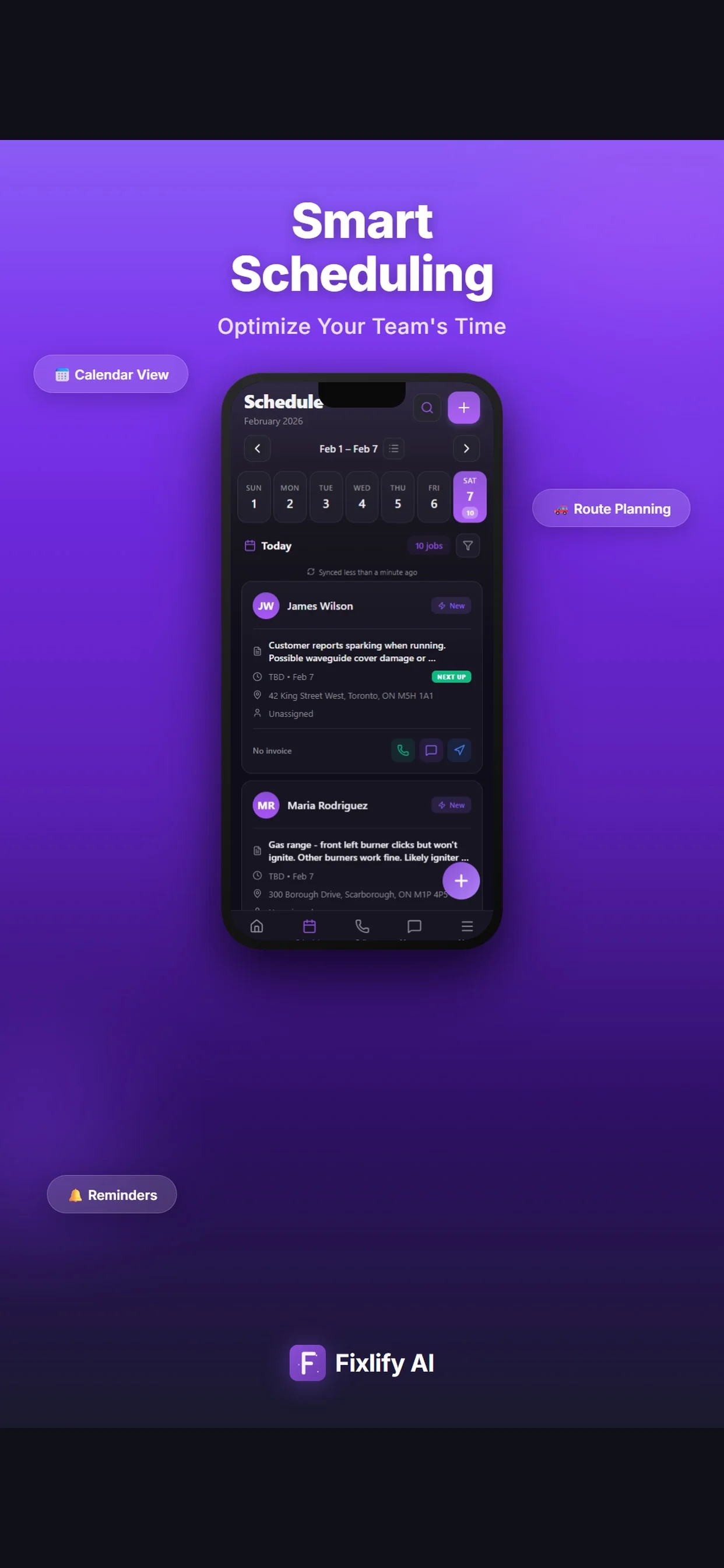
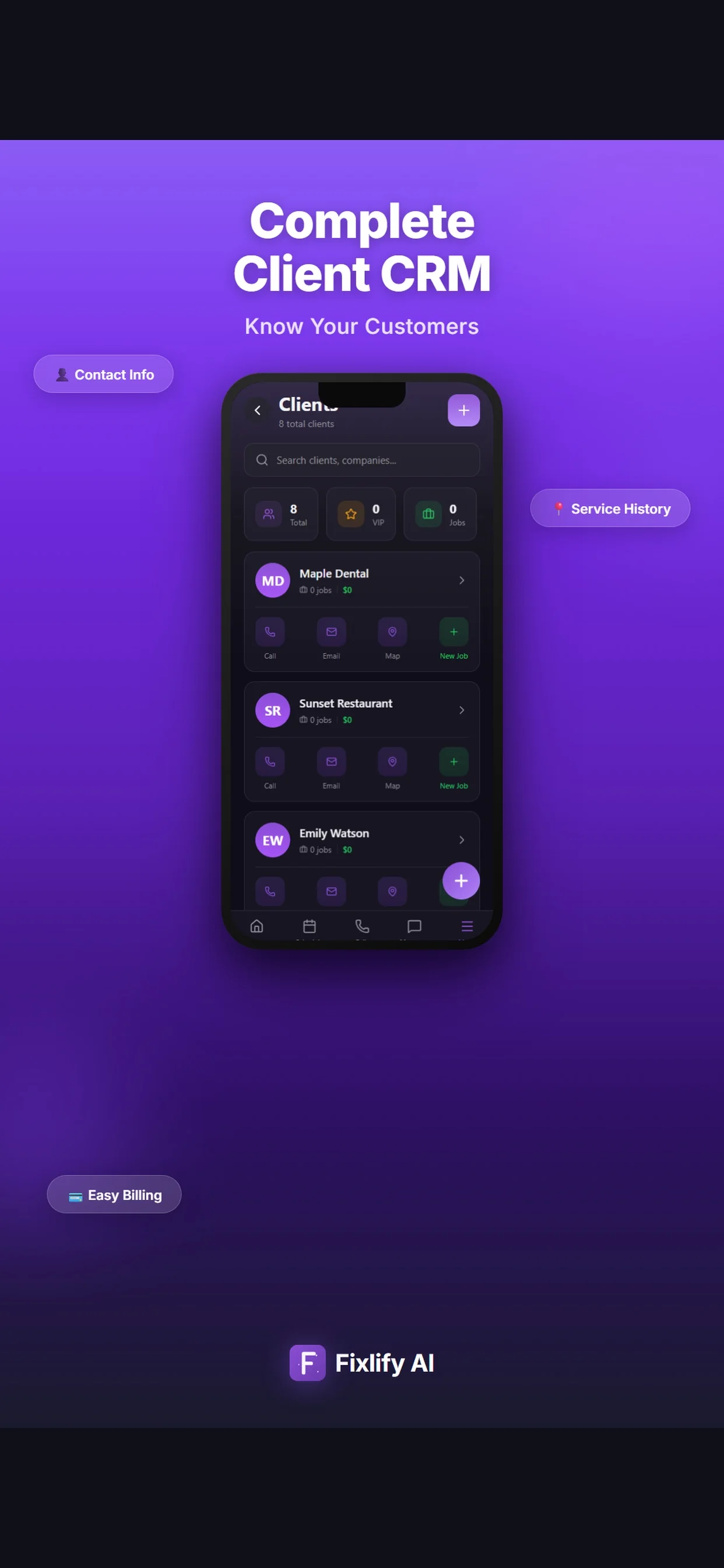
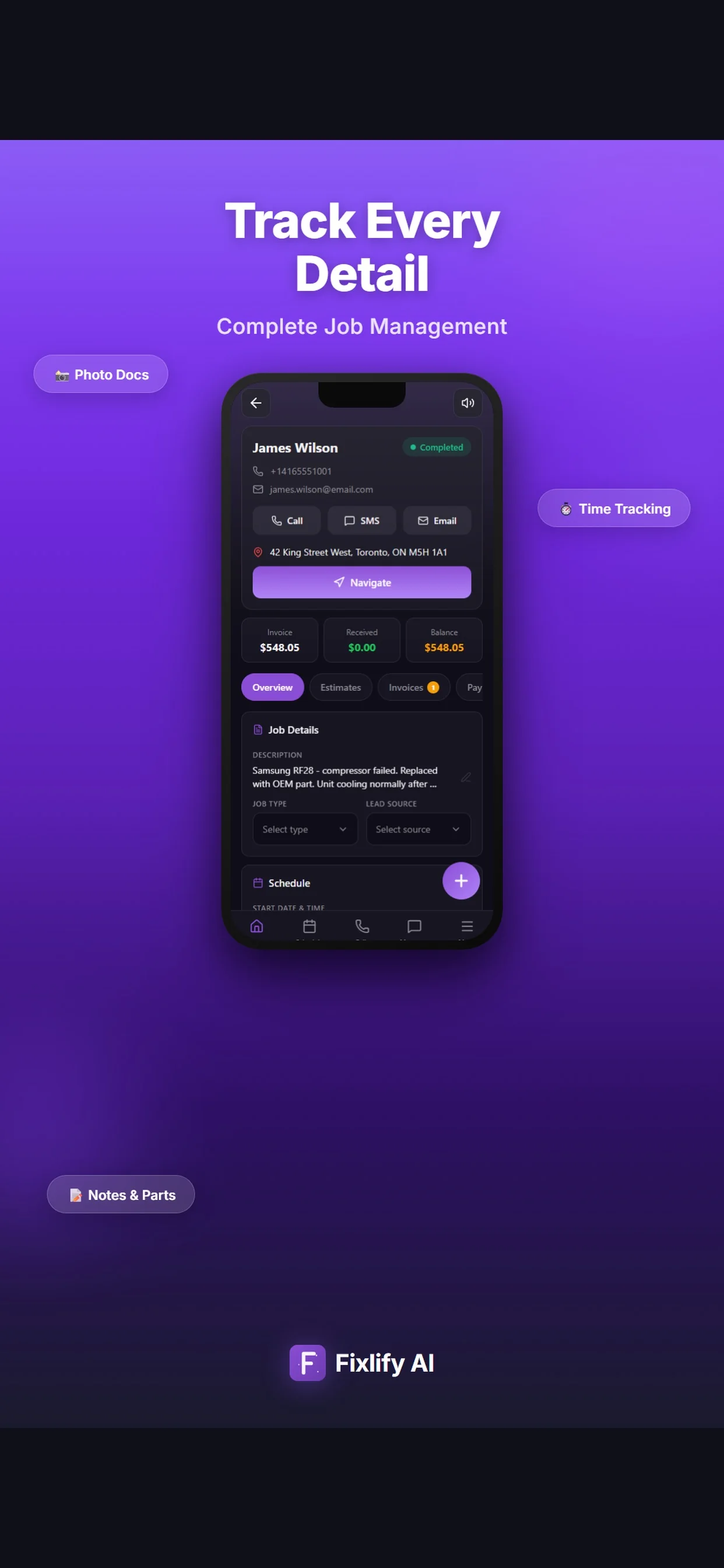
These official App Store images show current customer, job, and schedule screens. They demonstrate where a handyman team can review assigned work and customer context. The listing uses sample data; available actions depend on workspace configuration and permissions.

Official App Store listing screenshots · captured August 25, 2026 · View the official listing

Official Fixlify iOS App Store image showing the field service client list
Client list with contact actions, job count, and a path to related work.
Official Fixlify iOS App Store image showing a field service job record
Job details connecting the customer, address, notes, schedule, and invoice balance.
Official Fixlify iOS App Store image showing the technician schedule
Schedule view with dated jobs, assignment state, and customer contact actions.

Buyer checklist

How to evaluate handyman business software

Use the same anonymized customer and task list in every trial. Test a normal visit, a scope change, a return visit, and a billing correction so the comparison includes exceptions rather than only a perfect demo.

Multi-task request intake

The system should keep several requested tasks, the correct property, photos, access notes, and open questions together. Confirm that staff can distinguish customer descriptions from inspected and approved scope.

Test it: Create a returning customer request with three tasks, two photos, an access note, and one item requiring review.

Appointment duration and schedule changes

Handyman visits vary widely. Check whether the office can see the current task list while choosing duration, assigning a person, moving the appointment, and informing the customer through the configured process.

Test it: Extend and reschedule a multi-task visit without losing its notes, owner, or customer history.

Mobile field record

The assigned person needs the customer, address, task list, appointment, photos, and relevant history on the actual device used for work. Verify permissions and connectivity conditions.

Test it: Open the visit on a phone, add two findings and a photo, and confirm that the office sees the update.

Estimate structure and approval

Test hourly, flat-rate, minimum, travel, labor, material, tax, assumption, and exclusion requirements with the pricing method the business actually uses. Software should document the decision rather than invent the price.

Test it: Create, revise, share, and record approval for a task-by-task estimate with one excluded item.

Added scope and return visits

A customer-added task or hidden condition needs a controlled decision. Check how the team records the change, revised amount or deferral, approval, new appointment, and relationship to final billing.

Test it: Add one approved task and defer another to a return visit, then inspect the invoice and history.

Expenses and accounting boundary

Job materials and customer billing are not the complete books. Confirm receipt retention, expense classification, tax, invoice, payment, refund, reconciliation, and export ownership with the accounting process.

Test it: Export a sample customer, job, invoice, payment reference, and material record and reconcile them outside the demo.

Plan limits, usage, and exit

Compare members, monthly jobs, AI credits, phone numbers, communication use, payments, support, export, and renewal for the normal and busiest month. QuickBooks is currently marked coming soon in Fixlify.

Test it: Calculate twelve months for the expected team and export sample records plus attachments before signing.
Scope and limits

What Fixlify handyman software does not replace

Fixlify organizes customer and job operations. Keep legal scope, regulated work, technical decisions, specialist calculations, and financial controls with the qualified people, authorities, and systems responsible.

  • A contractor, trade, business, or occupational licence and the jurisdiction rules that define permitted handyman work
  • A permit application, plan review, inspection, code decision, structural assessment, or safety approval
  • A licensed electrician, plumber, gas professional, engineer, or other specialist when the task requires one
  • Dedicated takeoff, design, construction project management, procurement, warehouse inventory, or truck-stock control
  • Complete bookkeeping, receipt classification, payroll, tax filing, or automatic QuickBooks synchronization while that integration remains coming soon
  • A promise of job duration, route, booking, price, revenue, review, or customer outcome from configured AI intake or scheduling

For the people doing the work

One system, three views of the same job

A small team does not need three disconnected tools. Each person needs the part of the same customer record that helps them move the work forward.

Solo handyman

Keep the office with the job while working in the field

Review requests, appointments, customer context, estimates, and invoices without rebuilding the day from calls, notes, and separate calendars after work.

  • Organize task lists and property history
  • Review the next appointment and access details
  • Prepare customer estimates and invoices

Office coordinator

Turn mixed requests into schedulable work

Collect the task list and open questions, keep photos with the job, and review duration and assignment before offering or changing an appointment.

  • Capture several requested tasks
  • Flag scope or qualification questions
  • Keep customer changes on the same job

Small field team

Share the current scope without relying on memory

Open the assigned visit, review the agreed work and customer context, then add findings, photos, materials, and next actions for office review.

  • Review the latest task list
  • Add field notes and photos
  • Document changes before billing

For teams of 1–10

A practical fit for varied work and a small team

Fixlify is designed for a solo operator or small service team that wants customer requests, jobs, appointments, field updates, estimates, and invoices connected. Test a multi-task visit, schedule change, added-scope request, return visit, and invoice correction before moving the full calendar.

Review plan limits and pricing
  • You handle varied residential repairs, installations, punch lists, or turnover tasks
  • Customers commonly request several tasks at one property
  • One person may perform field work and manage customer documents
  • You want a clear estimate-to-invoice record for approved work
  • You can keep specialist trade, project, inventory, and accounting tools beside the job system when required

Questions before you start

Handyman software FAQ

Straight answers for owners deciding whether a connected job workflow fits their business.

What is handyman business software?

Handyman business software connects customer requests, service addresses, multi-task jobs, appointments, assigned people, field notes, estimates, approved changes, invoices, and service history for a solo operator or small team.

What is the best handyman software for a small business?

The best fit completes your real request-to-invoice workflow with acceptable setup, training, cost, and correction effort. Test a multi-task visit, schedule change, added-scope request, return visit, invoice correction, and export using the plan you would buy.

Can Fixlify schedule handyman jobs?

Fixlify keeps the customer, job, appointment, and assigned team member connected. A person reviews the task list, location, access, duration, availability, skills, travel, and existing commitments before making or changing the assignment.

Can a handyman use Fixlify from a phone?

Team members can review assigned work and customer context and update job information away from the office. Test the current iOS or web workflow, permissions, device, and connection conditions required by the business.

Can Fixlify estimate several tasks in one handyman visit?

You can prepare line items for the inspected and proposed tasks, labor, materials, charges, taxes, assumptions, and exclusions, then preserve the agreed scope for invoicing. The business remains responsible for measurements, pricing, legality, and approval.

Does handyman software decide which work needs a licence or permit?

No. Rules differ by jurisdiction, task, value, property, and project type. The business must check the relevant authority and use qualified specialists where required. Software can store references and decisions supplied by the team.

Does Fixlify track handyman expenses for tax filing?

Fixlify can keep job context and billed materials with estimates and invoices. It does not replace complete bookkeeping, receipt classification, payroll, tax advice, filing, or reconciliation controls. Confirm the accounting handoff separately.

Does Fixlify integrate with QuickBooks?

QuickBooks is currently marked coming soon. Do not assume automatic accounting synchronization. Review current import, export, invoice, payment, and reconciliation requirements with Fixlify and the business's accountant.

How much does Fixlify cost for a handyman business?

Free includes one member, up to 30 jobs per month, and 50 one-time AI credits. Pro is $49 per month for three members, up to 200 jobs, and 300 monthly AI credits. Business is $199 per month for ten members, unlimited jobs, and 1,000 monthly AI credits. Phone numbers and AI activity consume credits; check the pricing page for current terms.

Your next handyman job

Start with the work already on your schedule.

Create the customer, schedule the job, and keep the estimate and invoice connected. Start with 50 one-time AI credits and no card.

Run your next job in Fixlify
No credit cardNo contractCancel anytime

Optional analytics

Help us improve the site. We exclude form text and contact details. Privacy policy