Roofing software for teams of 1-10

Roofing software and CRM for service, repair, and project jobs

Roofing software and CRM for customer intake, inspections, scheduling, job photos, estimates, repairs, project visits, invoices, and customer history.

Reviewed · By Nick Petrus

  • 50 one-time AI credits
  • No credit card
  • One connected workspace

Built for leak inspections, repairs, storm-response visits, maintenance, replacements, return visits, and customer-approved scope changes.

Plain-language definition

What is Roofing business software?

Roofing software connects the customer, property, reported issue, inspection appointment, site notes, photos, team-supplied measurements, estimate, approved scope, scheduled work, field updates, invoice, and payment status. General field service software can organize that record; specialist roofing systems may still be required for aerial measurement, takeoff, material ordering, production boards, subcontractors, insurance supplements, permits, or job costing.

Where the day gets messy

The information gaps behind everyday Roofing work

These are coordination problems, not abstract software problems. Each one becomes easier when the call, job, calendar, and customer documents share a record.

A leak report is not an inspection

The caller may describe a stain, drip, missing shingle, storm event, or age concern without knowing the source or safe next step. The office needs the property, reported location, roof information available, photos, access, occupancy, urgency, and a human escalation path without turning the caller's description into a diagnosis.

Inspection evidence separates from the estimate

Site notes, photos, measurements, roof areas, observed conditions, proposed materials, exclusions, and customer questions often move between phones, email, and paper. The team needs one reviewable job history while qualified people remain responsible for measurements, takeoff, repair decisions, code, warranty, safety, and price.

Weather and site readiness change the schedule

Rain, wind, heat, material delivery, access, permits, occupied areas, other trades, and crew availability can move an inspection or project day. A shared schedule should show current appointments and assignments, but a person must review conditions and customer commitments before changing the plan.

Repairs and projects need different operating depth

A small repair may move from inspection to estimate and invoice quickly. A replacement or commercial project can require measurement, ordering, permits, production stages, subcontractors, equipment, safety controls, supplements, and several visits. The business should know which steps Fixlify organizes and which require a specialist roofing or project system.

Approved scope and final billing drift after field changes

Decking, flashing, ventilation, access, disposal, interior protection, or other conditions may differ from the initial proposal. The team needs to document the finding, revise or defer the work, obtain approval, and align the invoice with completed and accepted scope instead of reconstructing the change later.

One connected record

Call → Job → Schedule → Estimate → Invoice

A connected roofing workflow keeps intake, property context, inspection, appointments, technician-entered evidence, estimates, approvals, field updates, invoices, and payment status together. The contractor remains responsible for safety, qualifications, measurements, materials, weather decisions, permits, claims, schedule commitments, and final price.

  1. Call

    Capture the property and reported roof issue

    Record the caller, service address, reported interior and exterior symptoms, roof type or age when known, recent weather, customer-supplied photos, access, occupancy, insurance context, preferred timing, and any safety or emergency language requiring human review. Configured AI phone intake can follow approved questions and escalation rules.

    In this workflow: Ceiling stain after overnight rain, two customer photos, occupied home, roof access and source still unverified.

  2. Job

    Create one record for inspection and next actions

    Keep the customer report, property, attachments, inspection appointment, technician-entered notes, photos, team-supplied measurements, proposed action, estimate, approval, and follow-up on one job. Separate reported symptoms from inspected findings and confirmed scope.

    In this workflow: Inspection required; leak source, safe temporary action, measurement, material, warranty, and price pending review.

  3. Schedule

    Coordinate inspection, repair, and project visits

    Review location, urgency, appointment window, assigned people, expected duration, access, equipment, current weather information, material readiness, permits, travel, and existing commitments before confirming or moving a visit. Use connected appointments for multi-day work and return visits.

    In this workflow: Inspection Tuesday; repair appointment remains provisional until the responsible person confirms scope, conditions, and material readiness.

  4. Estimate

    Present the business-verified roofing scope

    Prepare line items from measurements, quantities, labor, materials, taxes, assumptions, exclusions, allowances, warranties, and prices supplied and checked by the business. Keep revisions and customer approval with the job without implying automatic measurement, takeoff, code review, claim approval, or material ordering.

    In this workflow: Reviewed repair option with flashing and labor line items, access assumptions, exclusions, and approval recorded before scheduling.

  5. Invoice

    Bill completed and approved work

    Review the accepted estimate, field notes, photos, completed areas, approved changes, deferred work, deposits, taxes, payments, and customer documents before sending or correcting the invoice. Preserve the history for callbacks, maintenance, warranty questions, and future work.

    In this workflow: Inspection, approved repair, documented change, completion notes, invoice, and balance remain connected.

Try the workflow with a real job.The free plan does not require payment details.
Start free

See the current Fixlify mobile job workflow

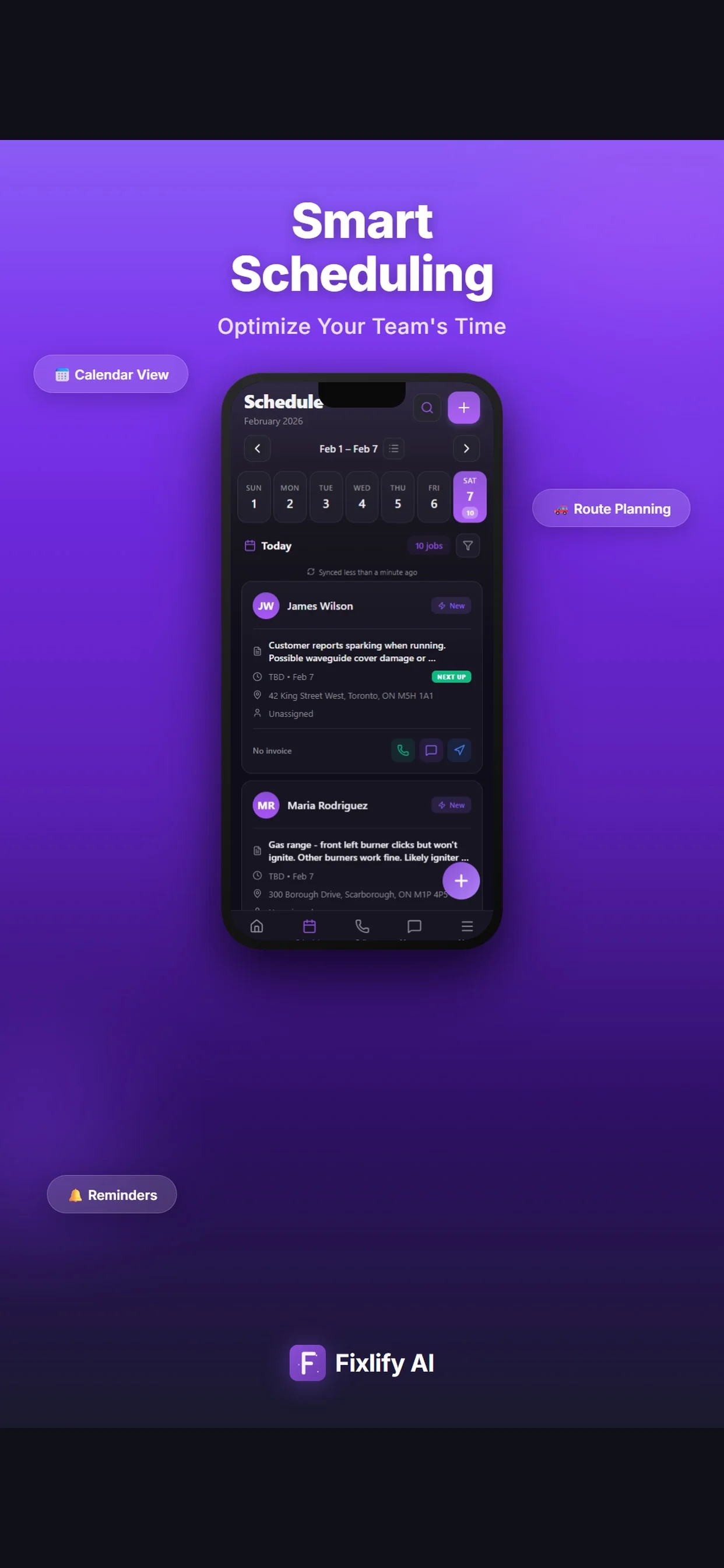
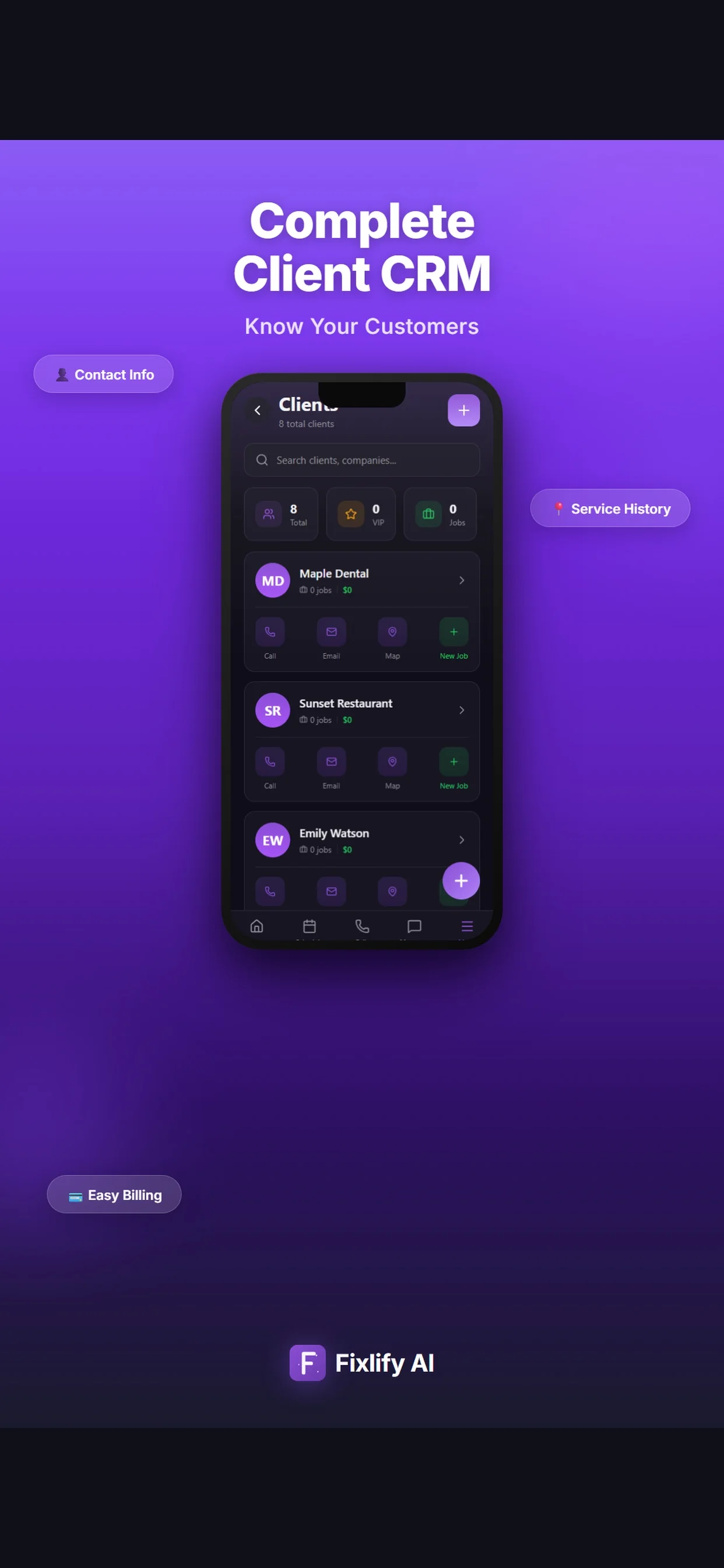
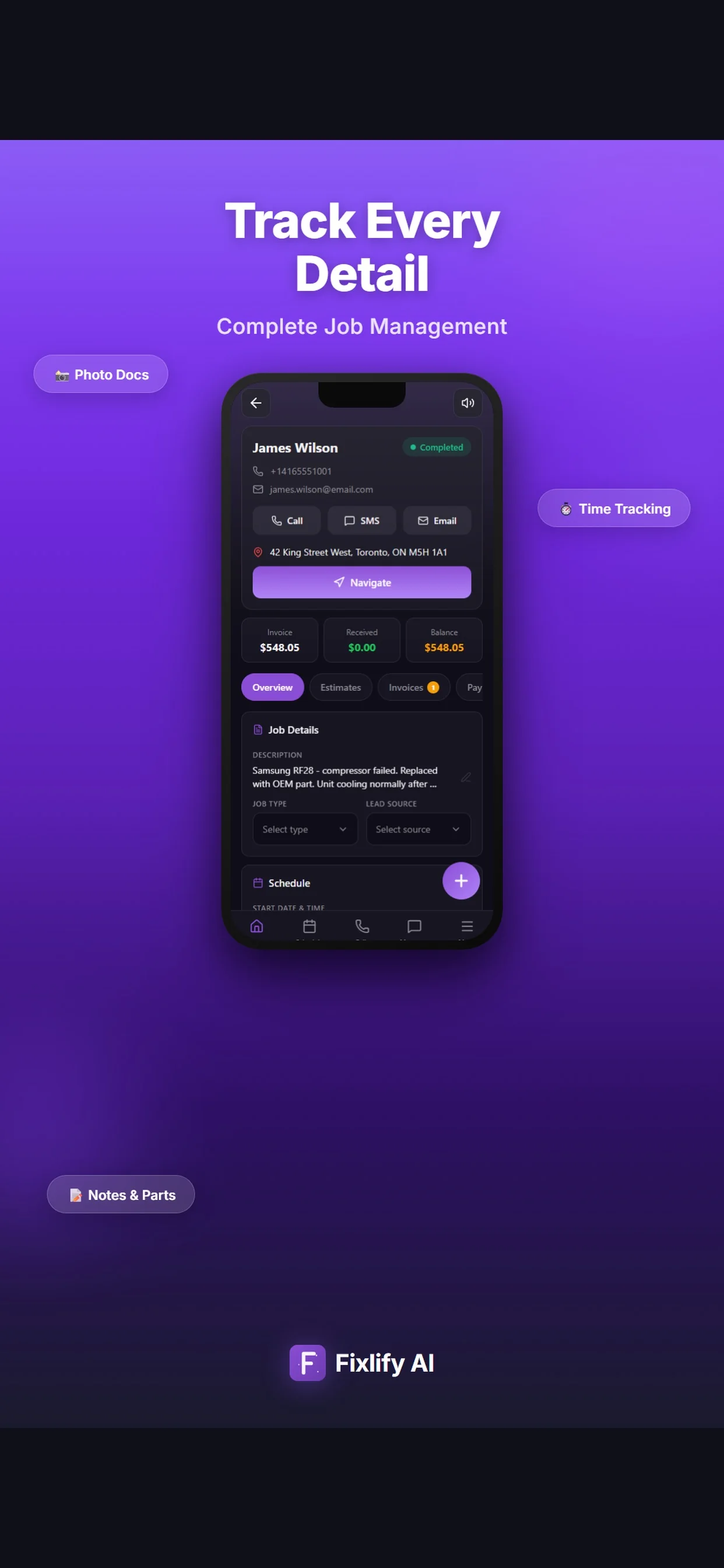
These official App Store images show current customer, job, and schedule screens. They demonstrate where a roofing team can review assigned work and customer context. The listing uses sample data; available actions depend on workspace configuration and permissions.

Official App Store listing screenshots · captured August 25, 2026 · View the official listing

Official Fixlify iOS App Store image showing the field service client list
Client list with contact actions, job count, and a path to related work.
Official Fixlify iOS App Store image showing a field service job record
Job details connecting the customer, address, notes, schedule, and invoice balance.
Official Fixlify iOS App Store image showing the technician schedule
Schedule view with dated jobs, assignment state, and customer contact actions.

Buyer checklist

Eight tests for roofing contractor software

Use one anonymized but representative job in every trial. Include incomplete intake, an inspection, team-supplied measurements, a weather or material dependency, a scope change, customer approval, an invoice correction, and an export so the comparison covers real exceptions.

Roofing request intake

Intake should preserve the customer, property, reported interior and exterior symptoms, roof information available, recent weather, photos, access, occupancy, insurance context, requested timing, and questions requiring review. It must distinguish a caller report from inspected findings.

Test it: Call with an active leak report and incomplete roof information, add customer photos, and confirm the correct customer, job, notification, assignment, safety handoff, and booking decision.

Inspection and measurement handoff

The field record should keep technician-entered observations, photos, roof areas, measurements supplied by the team, condition notes, and open questions with the job. It should not imply automated aerial measurement, takeoff, code verification, engineering, or diagnosis.

Test it: Complete an inspection on the real field device, add photos and team-supplied measurements, correct one note, and confirm the office sees the original report, current findings, permissions, and history.

Estimate, proposal, and approval

The estimate should use business-verified quantities, labor, materials, taxes, assumptions, exclusions, allowances, options, warranty language, and prices. Compare versions, signatures or approvals, deposits, declined work, financing handoffs, and final scope.

Test it: Create repair and replacement options, revise one quantity and exclusion, record the customer's decision, collect the intended approval evidence, and compare the accepted version with the job.

Scheduling, dispatch, and route review

Roofing scheduling software should show inspections, project appointments, assignments, travel, multi-day work, and changes. Confirm what a person reviews before a time or route is committed, especially when weather, equipment, materials, or crew suitability changes.

Test it: Schedule an inspection and two-day project, add an urgent repair, change current weather or material readiness, review the route, and confirm every assignment, customer promise, notification, and override.

Production and material boundary

List every measurement, takeoff, price book, supplier, order, delivery, equipment, permit, crew, subcontractor, production stage, quality-control, safety, waste, and job-cost requirement. A connected job record does not prove a specialist production or material platform.

Test it: Trace one replacement through each current system, mark the record owner and identifier, then test the import, export, reconciliation, delay, correction, and manual handoff at every boundary.

Insurance, supplement, and document boundary

Photos and references can stay with a job, but that does not establish carrier integration, estimate-format parity, claim submission, scope matching, supplement management, mortgage-check handling, depreciation recovery, or claim approval. Define the responsible person and system.

Test it: Use a sample storm job to map customer authorization, inspection evidence, external estimate, claim reference, supplement decision, approved scope, payment stages, retention, and every action that must remain outside the field-service system.

Mobile, permissions, and connectivity

An app listing does not prove full offline operation. Define which roles can see customer details, measurements, prices, photos, notes, estimates, invoices, payments, and schedule changes, plus what must work on a roof, at a rural property, or during weak connectivity.

Test it: Run the inspection and field-update steps on the actual phone and connection, remove connectivity, change a permission, reconnect, and inspect synchronization, duplicates, corrections, and audit behavior.

Twelve-month cost and exit

Compare users, jobs, AI credits, phone number, calls, messages, payments, measurement services, supplier and claim systems, add-ons, migration, training, support, accounting, storage, taxes, renewal, internal labor, parallel operation, export, retention, and cancellation.

Test it: Calculate low, expected, and storm-busy-month use for a year, then export customers, properties, notes, appointments, documents, photos, estimates, invoices, and payment references before signing.
Scope and limits

What Fixlify roofing software does not replace

Fixlify organizes the customer and job workflow. Keep roofing measurements, technical decisions, safety, production, materials, claims, accounting controls, and regulated work with the qualified people and systems responsible.

  • Automatic aerial measurement, satellite or drone measurement, roof sketch, takeoff, pitch or area calculation, waste factor, material quantity verification, code check, engineering, damage diagnosis, or repair instruction
  • A roofing catalog, price book, supplier marketplace, bulk material order, delivery, warehouse, inventory, equipment, purchase order, subcontractor, payroll, or automatic replenishment system
  • A complete roofing production board, crew-capacity planner, construction schedule, permit tracker, inspection authority, safety program, fall-protection control, quality-control system, or project-management replacement
  • Insurance estimate creation or parity, carrier integration, claim submission, scope matching, supplement management, adjuster negotiation, mortgage-check processing, depreciation recovery, coverage decision, or claim approval
  • Manufacturer registration, warranty eligibility, warranty claim, material suitability, installation instruction, product certification, licensing, permit, inspection, OSHA, building-code, or legal decision
  • Automatic QuickBooks synchronization while that integration remains marked coming soon, or guaranteed parity with an existing accounting, measurement, supplier, production, claim, or roofing platform
  • Full offline operation, guaranteed live GPS, autonomous dispatch, unattended route optimization, automatic weather monitoring, automatic crew-skill matching, or automatic rescheduling around weather and deliveries
  • A Fixlify phone number requires a paid plan and 70 credits per month before calls; AI and phone activity consumes more credits. Do not let AI diagnose roof conditions, make safety or insurance decisions, calculate measurements, quote unverified prices, or promise unsupported appointment conditions. Fixlify does not guarantee a booking, response, measurement, claim, schedule, route, project, revenue, review, migration, or roofing result

For the people doing the work

One system, three views of the same job

A small team does not need three disconnected tools. Each person needs the part of the same customer record that helps them move the work forward.

Roofing owner-operator

Manage requests and customer documents between jobs

Review new inquiries, property context, appointments, photos, estimates, invoices, and follow-up without rebuilding the day from personal messages, paper notes, and separate calendars.

  • Capture inspection requests
  • Review the next property and open questions
  • Prepare and track customer documents

Office or production coordinator

Move each job to the next verified stage

See whether the work needs an inspection, measurement, estimate decision, permit, material confirmation, scheduled visit, customer update, return appointment, or billing follow-up before making another commitment.

  • Review schedule dependencies
  • Keep changes and assignments with the job
  • Coordinate customer and field updates

Inspector, estimator, or field lead

Open current scope and return field evidence

Review the customer, property, reported issue, access, appointment, and prior record, then add technician-entered findings, photos, measurements supplied by the team, completed work, and questions for office review.

  • Review property and job context
  • Add site notes and photos
  • Document findings, work, and next actions

For teams of 1–10

A practical fit for roofing service and smaller project workflows

Fixlify is designed for a solo operator or small team that wants calls, customers, jobs, scheduling, assignments, field records, estimates, invoices, payments, and follow-up connected. Test a leak inspection, repair, multi-day job, weather delay, scope change, return visit, invoice correction, mobile update, and export before moving live work.

Review plan limits and pricing
  • You schedule inspections, repairs, maintenance, replacement visits, or callbacks
  • Your team needs property notes, photos, appointments, estimates, approvals, and invoices in one history
  • A qualified person will verify safety, diagnosis, measurements, takeoff, materials, code, warranty, claim, crew, schedule, and price
  • You can keep aerial measurement, supplier ordering, production boards, subcontractor controls, insurance supplements, permitting, and specialist job costing in their responsible systems when required
  • Your team fits the published member and job limits and can test the actual mobile and connection conditions

Questions before you start

Roofing software FAQ

Straight answers for owners deciding whether a connected job workflow fits their business.

What is roofing software?

Roofing software connects customer requests, properties, inspections, appointments, assignments, notes, photos, estimates, approved changes, project visits, invoices, payments, and history. Specialist systems may add aerial measurement, takeoff, supplier ordering, production boards, subcontractor management, insurance supplements, permits, or roofing job costing.

What is the best roofing software for a small contractor?

The best fit completes your representative request-to-invoice workflow with acceptable setup, correction effort, total cost, and specialist-system handoffs. Test a leak inspection, estimate revision, multi-day job, weather delay, scope change, return visit, invoice correction, mobile use, and export in the plan you would buy.

Can Fixlify schedule and dispatch roofing jobs?

Fixlify can keep the customer, property, job, appointment, and assigned person connected. A person reviews urgency, roof context, access, equipment, technician or crew suitability, duration, travel, current weather information, material readiness, permits, existing commitments, and the customer promise before confirming a schedule or route change.

Can Fixlify answer calls for a roofing company?

Configured AI phone intake can collect approved details and follow booking and human-escalation rules on paid plans. A phone number requires 70 credits per month before calls, and activity consumes credits. Test leak and storm language, incomplete property details, price requests, unsupported work, conflicts, insurance questions, and transfers before production use.

Does Fixlify measure roofs or calculate roofing materials?

No automatic aerial or drone measurement, roof sketch, takeoff, pitch or area calculation, waste factor, or material quantity verification is claimed. The business supplies and verifies measurements, quantities, product suitability, assumptions, exclusions, and prices before using them in an estimate.

Can Fixlify manage roofing insurance claims and supplements?

Fixlify can keep team-entered references, notes, photos, appointments, estimates, and customer documents with a job. It is not represented as a carrier integration, insurance-estimating system, claim-submission platform, scope-matching or supplement tool, mortgage-check processor, depreciation-recovery system, or claim decision service.

Can Fixlify manage multi-day roofing projects and weather delays?

You can create connected appointments and keep assignments, notes, photos, changes, and customer updates with the job. A person remains responsible for weather review, safety, crew capacity, equipment, materials, deliveries, permits, subcontractors, dependencies, customer commitments, and the final schedule.

Does Fixlify integrate with QuickBooks?

QuickBooks is currently marked coming soon. Do not assume automatic synchronization. Define the accounting system of record, required customers, items, taxes, estimates, invoices, payments, refunds, deposits, job costs, exports, reconciliation, and historical access before switching.

How much does Fixlify cost for a roofing business?

Free includes one member, up to 30 jobs per month, and 50 one-time AI credits. Pro is $49 per month for three members, up to 200 jobs, and 300 monthly AI credits. Business is $199 per month for ten members, unlimited jobs, and 1,000 monthly AI credits. Phone numbers and AI activity consume credits; check current pricing terms.

Your next roofing job

Start with the work already on your schedule.

Create the customer, schedule the job, and keep the estimate and invoice connected. Start with 50 one-time AI credits and no card.

Run your next job in Fixlify
No credit cardNo contractCancel anytime

Optional analytics

Help us improve the site. We exclude form text and contact details. Privacy policy