πŸ“±

Mobile field service app for technicians

Open an assigned job, review its address and instructions, and record notes, photos, and progress from the field. Fixlify keeps that work connected to the customer and job record. Available actions depend on your role, plan, and connection.

Updated Β· By Nick Petrus

βœ“Free plan: 1 member, 30 jobs/monthβœ“No credit card neededβœ“50 one-time AI credits
Jobs
Assigned Work
Status
Job Status Updates
Photos
Notes and Photos
Documents
Estimates and Invoices
Start with a one-time allowance of 50 AI creditsNo credit card requiredYou choose what to automate

How it works

  1. Create your workspace with a one-time allowance of 50 AI credits and no credit card.
  2. Bring your customer conversations, jobs, and follow-up into one workflow.
  3. Choose where AI assists your team and keep control of every decision.

Common mobile app problems
worth checking in your workflow

Use these workflow gaps when comparing field service app for your team.

!

Technicians call the office to retrieve information already on the job.

!

Field photos remain on a personal phone instead of the service record.

!

The office waits to learn whether a visit is complete.

!

Estimates and invoices are postponed until someone returns to a desk.

!

A field team needs clear access to its assigned work and customer details.

Start with one real job and confirm how the workflow fits your team.

Explore Fixlify β†’

How the workflow fits together
in 4 practical steps

Start with one mobile app workflow. Review your records, configuration, and team responsibilities before using it with customers.

1
β†’
πŸ“‹

Open the Assigned Job

Review the customer, service address, appointment, and job instructions available to your role before the visit.

2
β†’
πŸ“Έ

Record Field Findings

Add the notes and photos that explain what the technician found and what work was performed.

3
β†’
πŸ”„

Update the Job

Record progress and status so the office can review the same service record instead of waiting for a separate message.

4
βœ…

Review the Next Document

Prepare or review an estimate or invoice when it belongs to the authorized field workflow, then confirm the details before sharing it.

Explore This Workflow β†’

What you gain with
mobile app

What service businesses can do with Fixlify AI.

πŸ“‘
Jobs

Assigned Work

Review the jobs and appointment details available to your role.

⭐
Status

Job Status Updates

Record progress so the office can review the state of the work.

⏰
Photos

Notes and Photos

Capture field findings with the job they describe.

πŸ“
Documents

Estimates and Invoices

Prepare and review customer documents from an authorized mobile account.

πŸ“¦
Context

Customer Context

Keep the service address and useful customer information within reach.

πŸ”„
Notifications

Team Notifications

Receive configured notifications and review the related work in the app.

Explore Fixlify with 50 Free Credits β†’

How to choose a mobile field service app

A mobile field service app should give a technician the right job information at the point of service and return useful updates to the office. The best evaluation is a real device test: open an assigned job, find the address and instructions, add notes and photos, update status, and review the related estimate or invoice. Fixlify offers public iOS and Android apps connected to its field service workspace.

Who this workflow fits

  • Technicians who need assigned jobs, customer context, service addresses, notes, photos, status, estimates, and invoices away from the office.
  • Small service companies that want field updates attached to the job instead of scattered across calls, personal photo libraries, and message threads.
  • Office teams that need to review field progress while controlling which customer and billing information each member can access.

What to test before choosing

Run one job on the actual device

Install the current App Store or Google Play release, sign in with a realistic technician role, and open a sample assignment. Check text size, navigation, tap targets, address details, and the steps used most often during a visit.

Test field documentation

Add notes and photos to a sample job, then confirm that the office can find them on the correct record. Check camera and photo permissions and decide what information should never remain only on a personal device.

Verify status and document controls

Update a job and review the result from the office workspace. If technicians prepare estimates or invoices, confirm their permissions and require a review of customer, scope, amounts, taxes, and recipients before sending.

Test weak connectivity

Repeat the critical workflow with the connection conditions technicians actually encounter. Identify what loads, saves, queues, or fails, and give the team a fallback rather than assuming every action is available offline.

See the current Fixlify iOS field workflow

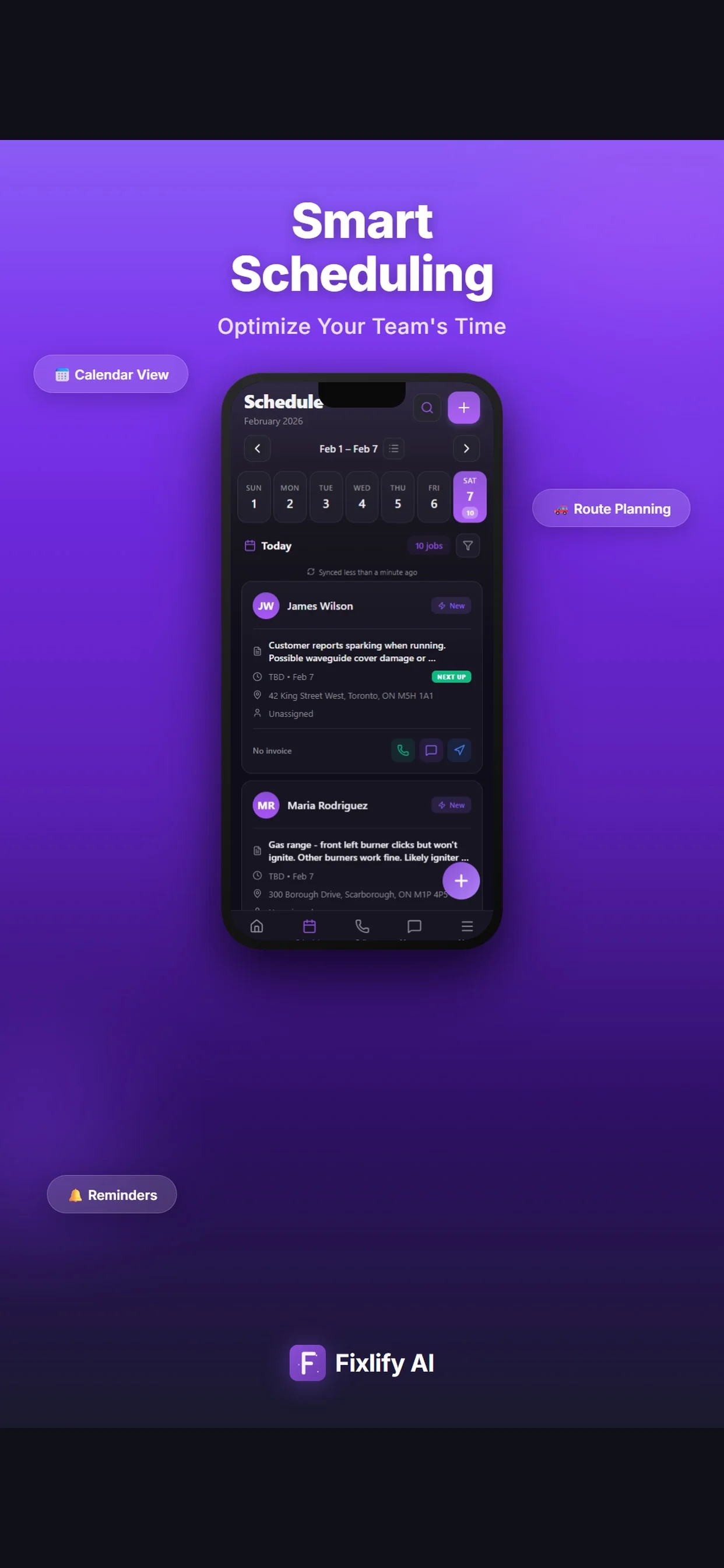
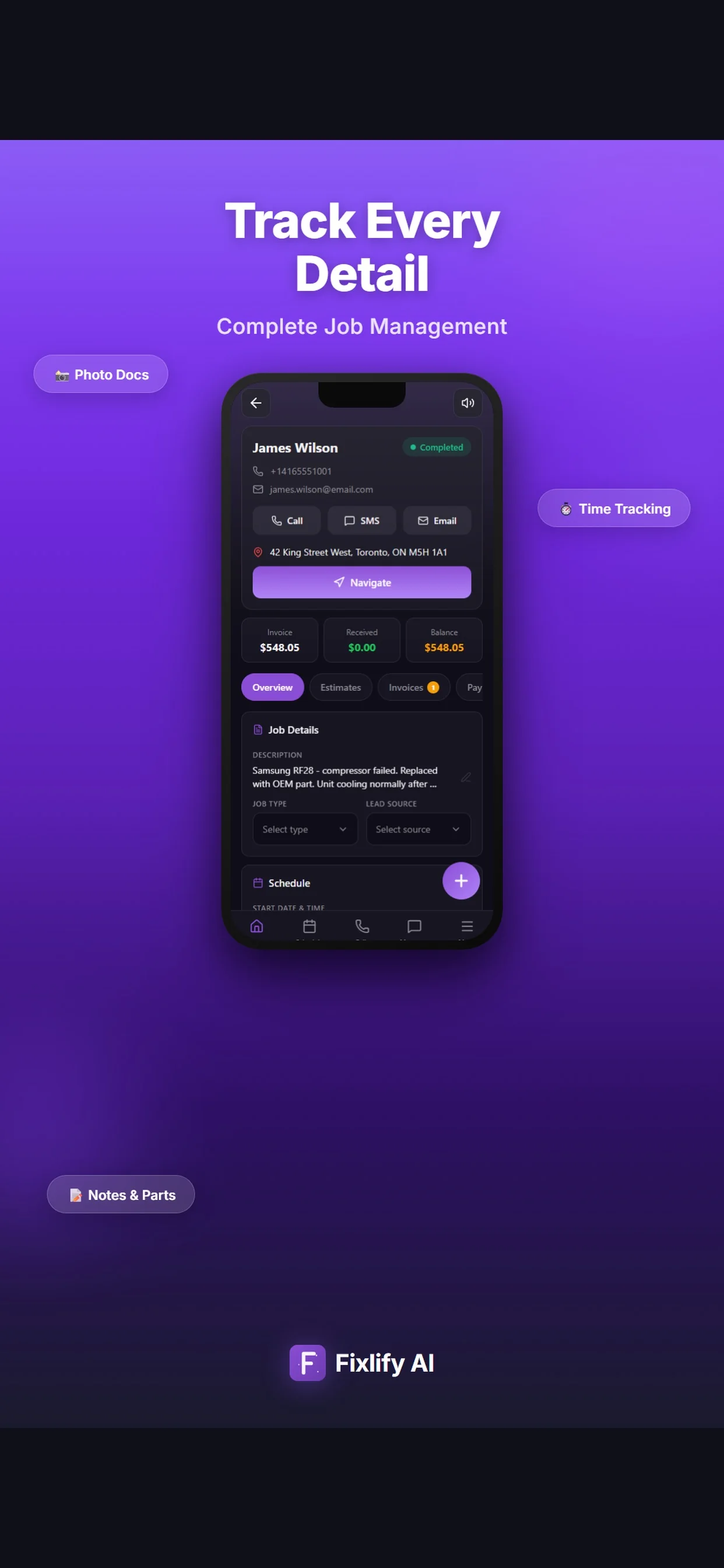
These official App Store images show the dashboard, job details, and schedule views in the current Fixlify mobile app. The records and values shown in the listing are sample data; available actions still depend on the workspace configuration and user permissions.

Official App Store listing screenshots Β· captured August 25, 2026 Β· View the official listing

Official Fixlify iOS App Store image showing the field service dashboard
Dashboard view with job totals, recent activity, and today's work.
Official Fixlify iOS App Store image showing a field service job record
Job details view with contact actions, address, invoice balance, notes, and schedule.
Official Fixlify iOS App Store image showing the technician schedule
Schedule view with dated jobs, assignment state, and customer contact actions.

How different service businesses
use mobile app

Example workflows show how these tools can fit different service businesses. See all 14 industries we serve.

Appliance

Opening an Appliance Repair Job

Example: an appliance technician opens an assigned job to review the fault description and address before arrival.

Workflow goal: The field visit uses the same information collected by the office.
HVAC

Recording HVAC Inspection Findings

Example: an HVAC technician adds photos and notes after inspecting equipment.

Workflow goal: The office can review the recorded findings alongside the job.
Electrician

Updating a Field Job

Example: an electrician updates job status before contacting the office about the next appointment.

Workflow goal: The team has a shared record of work progress.
Plumbing

Preparing a Customer Document

Example: a plumber prepares an invoice from the job after checking the completed scope.

Workflow goal: The document stays connected to the customer and service visit.

Frequently asked questions
about mobile app

Answers to common buyer questions about field service app.

Does Fixlify have iOS and Android apps?

+
Yes. The website links to the current App Store and Google Play listings. Create your workspace and sign in with the account your team uses.

What can a technician do in the app?

+
A technician can review assigned work, update job information, and capture notes and photos. Available actions depend on the member’s role and plan.

Does the mobile app work offline?

+
Plan to use an internet connection for your field workflow. Calling, messaging, payments, uploads, and live updates can require connectivity; confirm any required job access or editing behavior on the actual device before relying on it in a low-signal location.

What does it cost to start with Fixlify?

+
Start without a credit card. Free includes one team member, up to 30 jobs per month, and a one-time 50 AI credits. Pro is $49/month for three team members, up to 200 jobs, and 300 AI credits each month. Business is $199/month for ten team members, unlimited jobs, and 1,000 monthly AI credits; extra team members cost $15/month. Check the pricing page for phone and usage details.

How should my team get started?

+
Create your workspace on the web, add the team members your plan allows, then install Fixlify from the linked App Store or Google Play listing and sign in with your team account. Check one assigned job and your required actions on the actual device before rolling it out to the team.

Still have questions? Talk to a real person.

Schedule a Free Demo

Explore More Fixlify AI Features

Connect this workflow with the customer, job, and billing tools your team needs. See all features

πŸ“…
Job Scheduling
πŸ‘₯
Client Management
πŸ“‹
Work Order Management

Mobile App Software by Industry

Explore how mobile app works for specific trades. See all 14 industries.

🎯 Cleaning Software🎯 Flooring Software🎯 Appliance Repair Software🎯 Roofing Software🎯 Plumbing Software🎯 Locksmith Software🎯 Electrical Software🎯 Handyman Software🎯 Pool Service Software🎯 Pest Control Software🎯 Landscaping Software

Ready to fix your
mobile app workflow?

Bring field service app into the same platform as scheduling, dispatching, invoicing, and customer communication. Start with one workflow, 50 one-time AI credits, and no credit card.

βœ“ Free plan with clear limitsβœ“ No credit card neededβœ“ Cancel anytimeβœ“ 50 one-time AI credits

Optional analytics

Help us improve the site. We exclude form text and contact details. Privacy policy