Electrical service software for teams of 1-10

Electrical dispatch software for calls, schedules, and jobs

Electrical scheduling and dispatch software for service teams. Connect customer requests, jobs, assignments, field notes, estimates, and invoices.

Reviewed · By Nick Petrus

  • 50 one-time AI credits
  • No credit card
  • One connected workspace

Built for residential diagnostics, repairs, planned installations, estimates, return visits, and customer follow-up.

Plain-language definition

What is Electrical business software?

Electrical dispatch software connects a customer request with the service address, job record, appointment, assigned technician, field notes, estimate, and invoice. It gives the office and field team one operational history while qualified people remain responsible for electrical work, licensing, permits, and safety decisions.

Where the day gets messy

The information gaps behind everyday Electrical work

These are coordination problems, not abstract software problems. Each one becomes easier when the call, job, calendar, and customer documents share a record.

New calls arrive while technicians are on site

Electrical service requests can arrive when the owner or dispatcher is already coordinating active work. The office needs the caller, property, reported issue, access details, and preferred time captured before deciding the next step.

The schedule lacks job context

A calendar entry alone does not show the customer description, site history, expected duration, qualification requirement, or whether the visit is diagnostic, planned work, or a return. The dispatcher needs that context before assigning a person.

Permit and inspection references live elsewhere

Numbers, dates, documents, and authority notes are often split across email, paper, and messages. Keeping references with the job helps the team find them, while the issuing authority and qualified person remain responsible for approvals and compliance.

A diagnostic visit becomes a new disconnected job

The first visit may lead to an estimate, a material-dependent return, an inspection milestone, or a changed scope. Each next action should remain tied to the original customer, site, and findings.

The invoice does not match the approved scope

When field notes, estimate revisions, approvals, and billing sit in separate tools, the office has to reconstruct what the customer accepted. Connected records make the final review more direct.

One connected record

Call → Job → Schedule → Estimate → Invoice

A connected electrical service workflow keeps the request, appointment, assignment, field record, estimate, and invoice together. People still decide urgency, technician suitability, technical scope, permits, and safety actions.

  1. Call

    Capture the request without diagnosing

    Record the caller, address, customer description, access constraints, preferred time, and the approved escalation path. Configured AI phone intake can ask your defined questions and route exceptions to a person.

    In this workflow: Returning customer; partial power; no diagnosis promised; urgent exception sent to the on-call person.

  2. Job

    Keep site history and requirements together

    Create one job record for the request, service address, previous work, notes, photos, qualification requirements supplied by the business, and any permit or inspection references the team needs to review.

    In this workflow: Diagnostic job connected to the correct property, earlier panel notes, and access instructions.

  3. Schedule

    Review before assigning the visit

    Check the calendar, location, job type, expected duration, availability, and required qualification before assigning or changing the appointment. A dispatcher or owner remains responsible for the decision.

    In this workflow: The office moves a planned visit and assigns the diagnostic after confirming availability and company policy.

  4. Estimate

    Document inspected scope and exclusions

    After the qualified person inspects the work, prepare labor and material line items, scope, assumptions, exclusions, taxes, and any alternatives the customer should review. Preserve revisions and the approval path.

    In this workflow: The estimate distinguishes diagnostic work already completed from the proposed repair and optional follow-up.

  5. Invoice

    Bill from the completed job record

    Review the recorded work, approved estimate, changes, and applicable payment status before issuing the invoice. Keep the customer document connected to the job for the next service conversation.

    In this workflow: Completed work, field notes, approved amount, invoice, and payment status remain in one history.

Try the workflow with a real job.The free plan does not require payment details.
Start free

See the current Fixlify mobile job workflow

These official App Store images show current customer, job, and schedule screens. They demonstrate where a electrical team can review assigned work and customer context. The listing uses sample data; available actions depend on workspace configuration and permissions.

Official App Store listing screenshots · captured August 25, 2026 · View the official listing

Official Fixlify iOS App Store image showing the field service client list
Client list with contact actions, job count, and a path to related work.
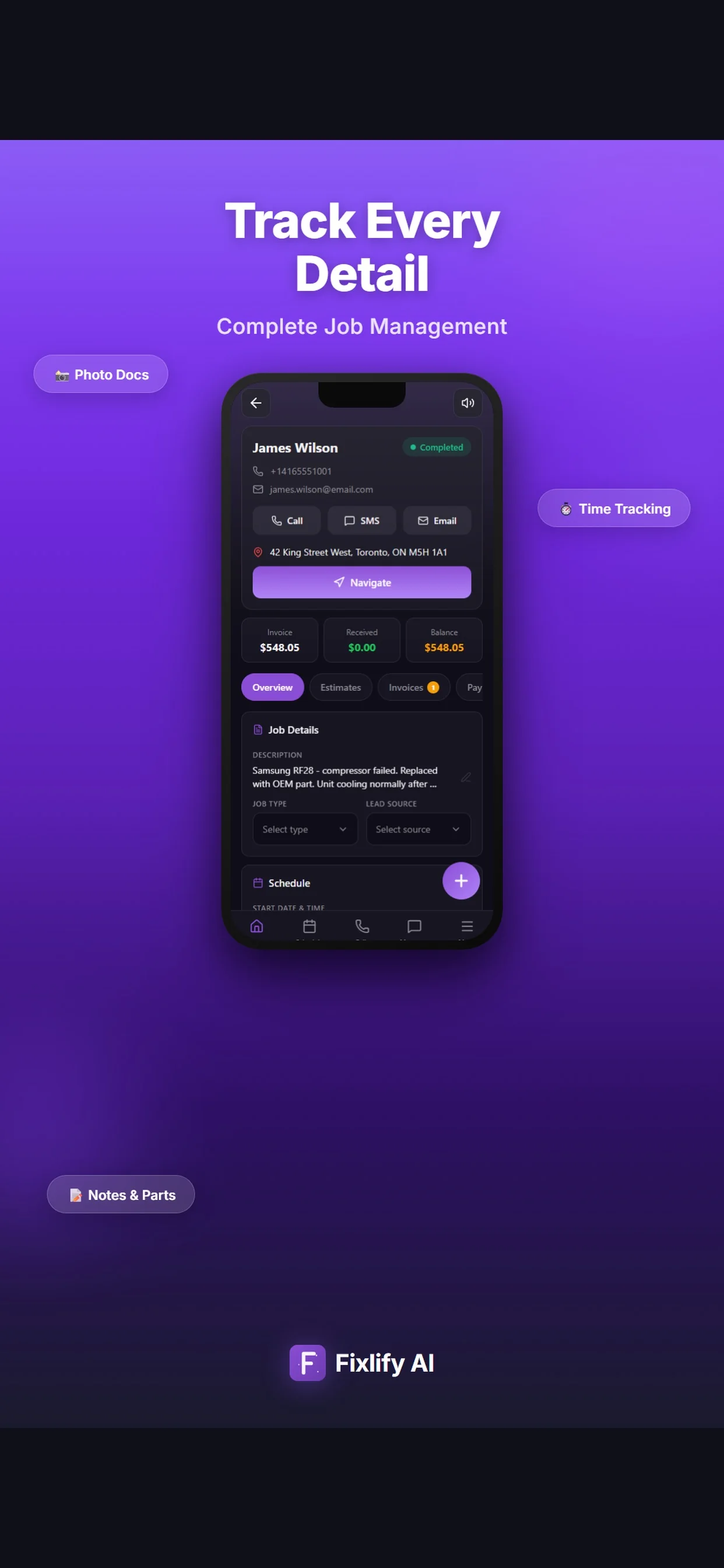
Official Fixlify iOS App Store image showing a field service job record
Job details connecting the customer, address, notes, schedule, and invoice balance.
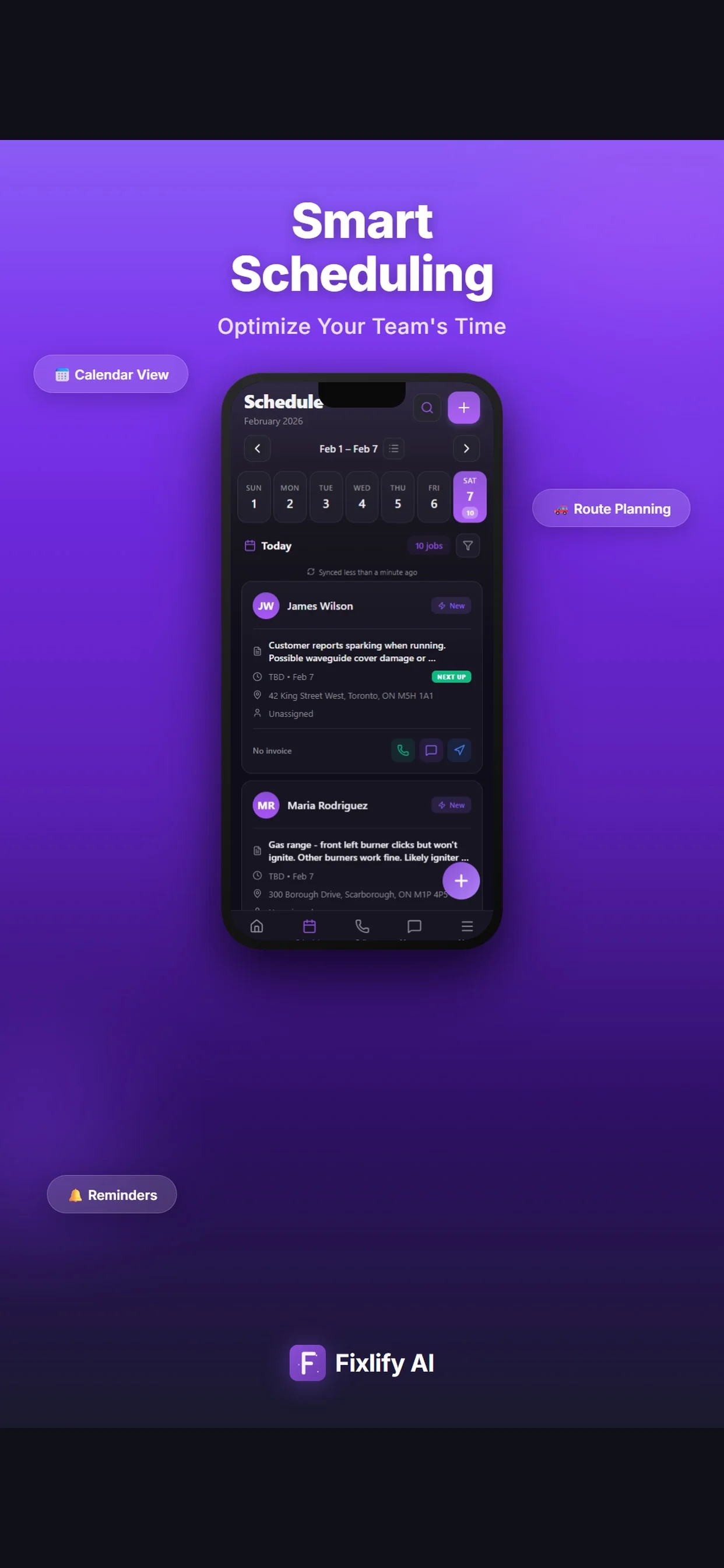
Official Fixlify iOS App Store image showing the technician schedule
Schedule view with dated jobs, assignment state, and customer contact actions.

Buyer checklist

How to evaluate electrical scheduling and dispatch software

Use the same anonymized jobs in every product evaluation. A returning-customer diagnostic, a planned installation with a changed appointment, and a return visit expose more useful differences than a feature checklist.

Request and property context

The next visit depends on the correct customer, address, reported issue, access notes, prior work, and attachments. Check how quickly the office can find that history while taking a new request.

Test it: Create a request for a returning customer with two properties and select the correct service address.

Scheduling and dispatch decisions

Electrical scheduling software should show enough job and calendar context for a person to make a responsible assignment. Do not treat automatic routing as automatic qualification or authorization.

Test it: Move a diagnostic between two technicians and verify that the request, notes, and appointment history remain intact.

Qualification and safety boundaries

The business must define which work requires which qualification and who handles a potentially hazardous request. Software can record and expose those requirements but should not silently certify the worker or diagnose the site.

Test it: Enter a request outside the normal booking rules and verify that it reaches the approved human escalation path.

Mobile field record

Technicians need the address, appointment, customer description, and relevant history on the devices they actually use. Test the required actions and connection conditions before adoption.

Test it: Open the assigned job on a phone, add a finding and photo, and confirm that the office sees the update.

Estimate-to-invoice handoff

An estimate should preserve the proposed scope, labor and material lines, exclusions, revisions, and approval. The office should be able to relate the completed work and invoice to the accepted version.

Test it: Create, revise, approve, complete, and invoice one representative electrical job.

Specialist system boundary

Electrical takeoff, assembly databases, supplier pricing, inventory, permit submission, progress billing, job costing, and accounting are separate requirements. Confirm each workflow rather than inferring it from a generic label.

Test it: List every required specialist handoff and ask the vendor to demonstrate the selected plan or export path.

Plan limits, usage, and exit

Compare members, jobs, AI credits, phone numbers, communication usage, payments, support, data export, and renewal using the same twelve-month scope. QuickBooks is currently marked coming soon in Fixlify.

Test it: Price the normal and busiest month, then export sample customers, jobs, documents, and invoice references.

Scope and limits

What Fixlify electrical service software does not replace

Fixlify coordinates operational records. Keep regulated work, technical decisions, specialist calculations, and financial controls with the qualified people, authorities, and systems responsible for them.

  • A licensed electrician's diagnosis, design, work method, safety assessment, or code-compliance decision
  • License verification, permit application, plan review, inspection, authority approval, or jurisdiction record
  • Dedicated electrical takeoff, assemblies, supplier pricing, procurement, warehouse inventory, or truck-stock control
  • Construction project accounting, committed cost, certified payroll, progress billing, or work-in-progress reporting unless demonstrated separately
  • Automatic QuickBooks synchronization while the Fixlify integration remains marked coming soon
  • A promise of response time, technician suitability, booking, routing, revenue, or customer outcome from configured AI intake

For the people doing the work

One system, three views of the same job

A small team does not need three disconnected tools. Each person needs the part of the same customer record that helps them move the work forward.

Owner-operator

Run the next service job without rebuilding the office later

Review new requests, appointments, field updates, estimates, and invoices from one workspace while still completing electrical work in the field.

  • See new and returning customer requests
  • Keep the service address and job history together
  • Review estimates and invoices before sending

Dispatcher or office lead

Coordinate planned and urgent work with context

Use the request, appointment, job requirements, and assigned person together when scheduling a diagnostic, installation, return, or follow-up.

  • Capture approved intake details
  • Review availability and requirements before assignment
  • Keep appointment changes attached to the job

Electrical technician

Open the assigned work and update the same record

Review the customer description, address, history, and appointment, then add findings and photos for the office without recreating intake notes.

  • Review job and customer context
  • Add field notes and photos
  • Record what the office needs for the next step

For teams of 1–10

A practical operating system for a small electrical service team

Fixlify is designed for teams that want a clear request-to-invoice workflow with published starting limits. Test a diagnostic, planned installation, return visit, revised estimate, and invoice correction before moving the full schedule.

Review plan limits and pricing
  • You handle residential or light-commercial service calls and planned work
  • One person may cover both field work and office decisions
  • Technicians need customer, property, and job context away from the office
  • You want scheduling, dispatch, estimates, and invoices in one workflow
  • You can keep specialist takeoff, project, inventory, permit, or accounting systems beside it when required

These pages are individually researched and cite current government sources. Other generated city combinations remain outside the search index until they pass the same review.

Questions before you start

Electrical software FAQ

Straight answers for owners deciding whether a connected job workflow fits their business.

What is electrical dispatch software?

Electrical dispatch software connects a customer request and service address with a job, appointment, assigned technician, field record, estimate, and invoice. The dispatcher or owner still reviews availability, requirements, urgency, travel, and technician suitability.

What is the best electrical contractor software for a small service team?

The best fit completes your actual request-to-invoice workflow with acceptable training, cost, and correction effort. Test a diagnostic, planned installation, return visit, revised estimate, invoice correction, and data export using the plan you would buy.

Can Fixlify schedule and dispatch electricians?

Fixlify keeps the customer request, job, appointment, and assigned team member connected. A person remains responsible for checking availability, location, work requirements, qualifications, urgency, and the final assignment.

Can an electrical technician use Fixlify in the field?

Team members can review assigned work and customer context and update job information away from the office. Test the current iOS or web workflow, permissions, device, and connection conditions your team requires before rollout.

Does Fixlify verify electrician licenses or qualifications?

No. Your team can record work requirements and qualification information for review, but Fixlify does not independently validate a license, certification, permit authority, or a person's suitability for regulated work.

Does Fixlify submit electrical permits or manage inspections?

You can keep references, dates, documents, and notes with the job. Fixlify is not a permit-submission, plan-review, inspection, or authority-approval system. Confirm the responsible person and jurisdiction process separately.

Is electrical service software the same as takeoff or estimating software?

No. Service software coordinates customer and field work. Dedicated electrical estimating or takeoff software can provide deeper drawing, quantity, assembly, material, labor, and bid workflows. Demonstrate the exact method your company requires.

Does Fixlify electrical software integrate with QuickBooks?

QuickBooks is currently marked coming soon. Do not assume automatic accounting synchronization. Review current import, export, invoice, payment, and reconciliation requirements with Fixlify and your accountant before moving active billing.

How much does Fixlify cost for an electrical service company?

Free includes one member, up to 30 jobs per month, and 50 one-time AI credits. Pro is $49 per month for three members, up to 200 jobs, and 300 monthly AI credits. Business is $199 per month for ten members, unlimited jobs, and 1,000 monthly AI credits. Phone numbers and AI activity consume credits; check the pricing page for current terms.

Your next electrical job

Start with the work already on your schedule.

Create the customer, schedule the job, and keep the estimate and invoice connected. Start with 50 one-time AI credits and no card.

Run your next job in Fixlify
No credit cardNo contractCancel anytime

Optional analytics

Help us improve the site. We exclude form text and contact details. Privacy policy