πŸ‘₯

Field service CRM for customer and job history

Keep customer contacts, service addresses, job history, and conversations in one workspace. Before a return visit, review the earlier job and add the information your team needs for the next appointment. Access depends on each team member’s role.

Updated Β· By Nick Petrus

βœ“Free plan: 1 member, 30 jobs/monthβœ“No credit card neededβœ“50 one-time AI credits
Contacts
Customer Contacts
Addresses
Service Addresses
History
Connected Job History
Messages
Conversation Context
Start with a one-time allowance of 50 AI creditsNo credit card requiredYou choose what to automate

How it works

  1. Create your workspace with a one-time allowance of 50 AI credits and no credit card.
  2. Bring your customer conversations, jobs, and follow-up into one workflow.
  3. Choose where AI assists your team and keep control of every decision.

Common client management problems
worth checking in your workflow

Use these workflow gaps when comparing field service crm for your team.

!

A returning customer has to explain details the team recorded before.

!

Service addresses and contact details live in different systems.

!

Access instructions disappear in an old message thread.

!

A technician needs context from earlier visits.

!

The office needs to connect a conversation with the relevant job and invoice.

Start with one real job and confirm how the workflow fits your team.

Explore Fixlify β†’

How the workflow fits together
in 4 practical steps

Start with one client management workflow. Review your records, configuration, and team responsibilities before using it with customers.

1
β†’
πŸ“‹

Find the Customer

Review the contact details and service information already recorded for the returning customer.

2
β†’
🧠

Check the Earlier Work

Read the relevant job history and notes before discussing the next visit.

3
β†’
πŸ“²

Connect the Next Job

Keep the new request and appointment associated with the customer.

4
🌐

Leave Useful Context

Record what the office or next technician needs, then review the related estimate or invoice.

Explore This Workflow β†’

What you gain with
client management

What service businesses can do with Fixlify AI.

πŸ”„
Contacts

Customer Contacts

Keep contact information with the customer record used by your team.

πŸ’Ύ
Addresses

Service Addresses

Record where work is needed and retain useful access instructions.

πŸ’°
History

Connected Job History

Review previous jobs when preparing for a returning customer.

βœ…
Messages

Conversation Context

Keep customer communication close to the work it concerns.

πŸ“ˆ
Notes

Field Notes

Capture findings and documentation that help the next team member understand the job.

🏠
Documents

Billing Context

Review the customer’s estimates and invoices alongside their service history.

Explore Fixlify with 50 Free Credits β†’

How to choose a field service CRM

A field service CRM organizes the customer relationship around work performed at a property. The useful record is more than a name and phone number: it connects contacts, service addresses, appointment history, job notes, conversations, estimates, and invoices. Fixlify is designed for that service history. If your main requirement is a complex sales pipeline, marketing automation, or enterprise account management, evaluate those needs separately.

Who this workflow fits

  • Small field service teams that return to the same customer or property and need the next technician to see the relevant history before a visit.
  • Businesses that currently split contact details, access instructions, job notes, conversations, estimates, and invoices across several tools.
  • Office and field users who need one service record with role-based access instead of sharing full customer information through personal messages.
What to test before choosing

Model customers and properties correctly

Test a customer with more than one service address, a property with a separate billing contact, and a returning customer. Confirm where access notes belong and how your team avoids attaching them to the wrong location.

Follow the complete service history

Open the customer record and trace one request through an appointment, work order, field note, estimate, invoice, and follow-up. Check whether the next authorized team member can understand what happened without searching another inbox.

Review roles and sensitive data

Decide which office and field roles should see customer contacts, addresses, billing records, private notes, and conversation history. Test the actual permissions with sample accounts before importing real customer information.

Plan imports and exports

List the fields, attachments, open work, and historical records you need to move. Ask Fixlify to confirm the supported import and export scope, then validate a small sample before making the new CRM your source of truth.

See customer records connected to field work

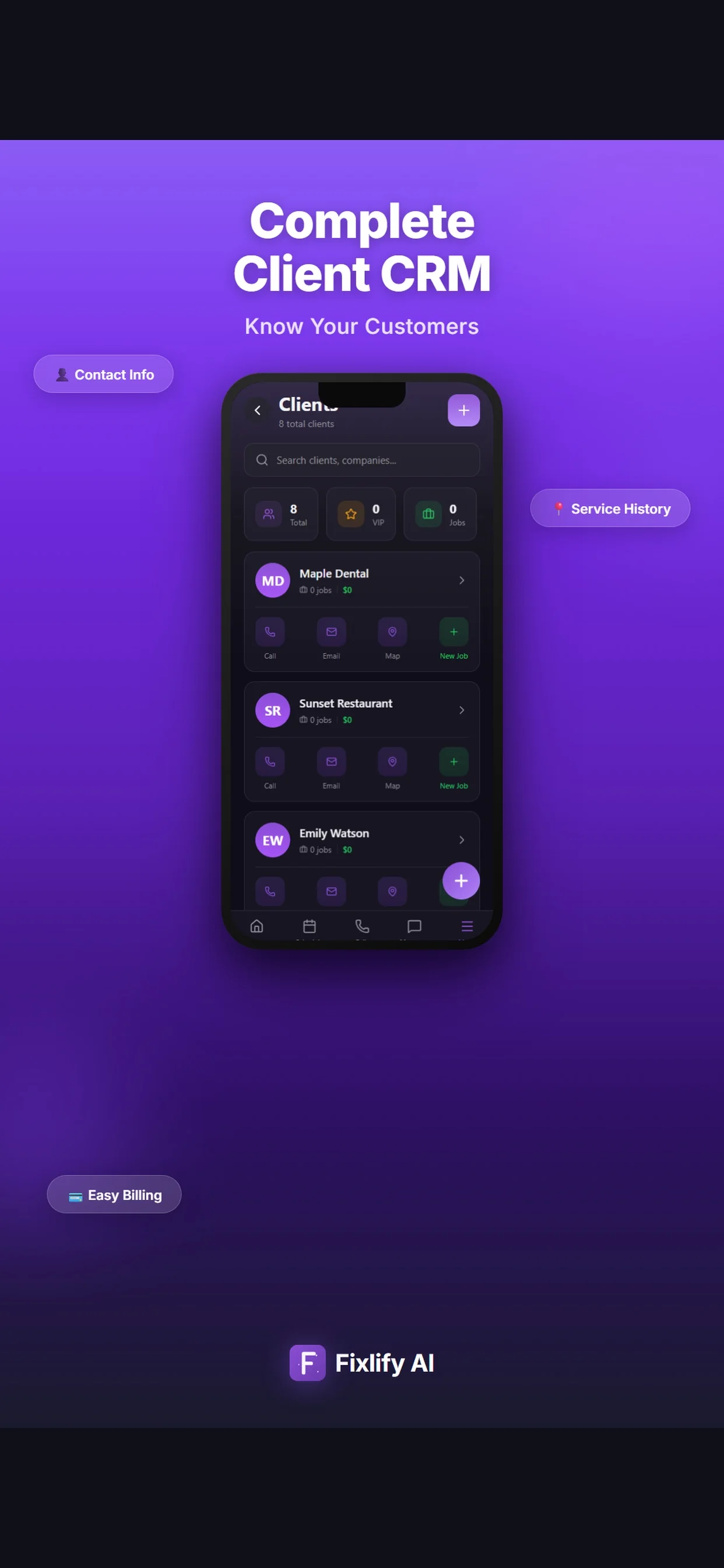
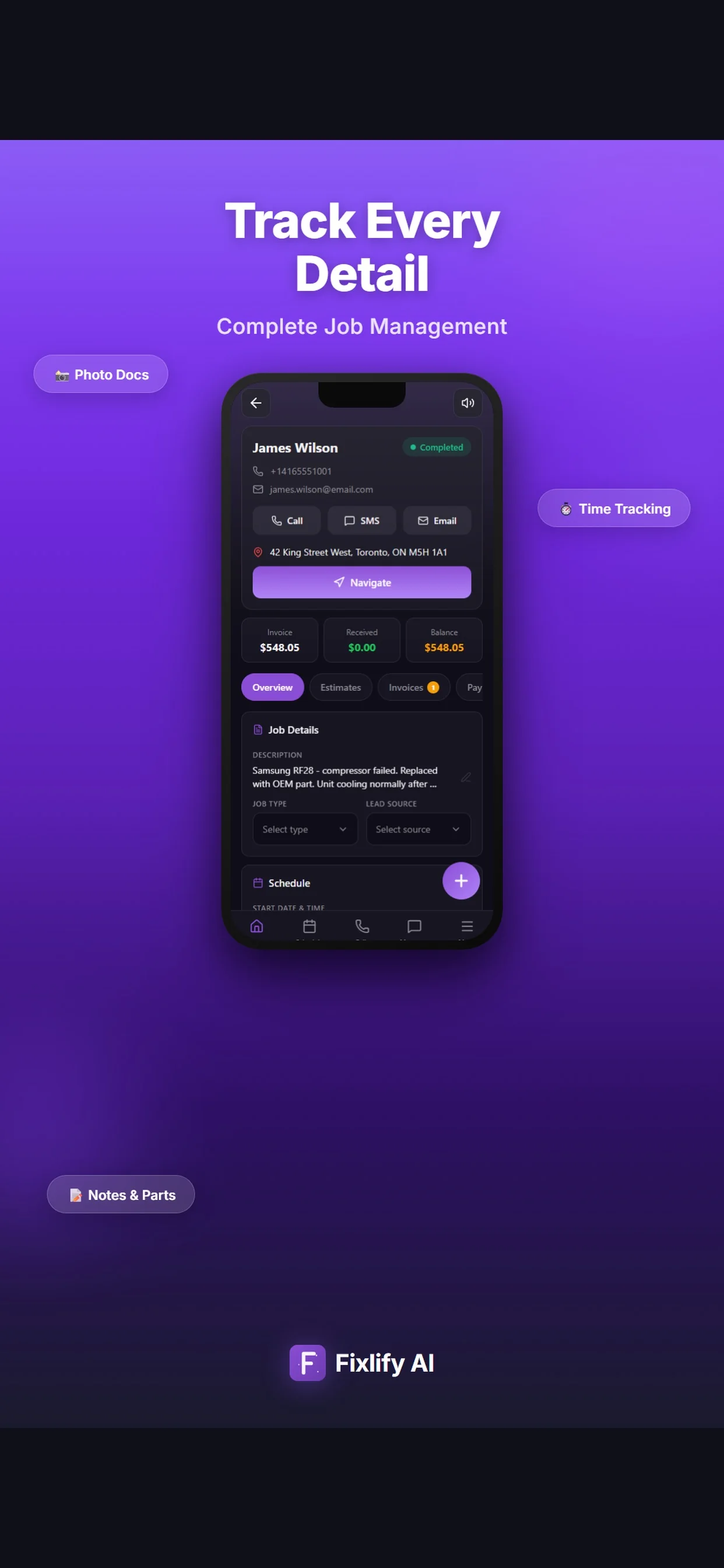
These official App Store images show the current Fixlify client list and job record on iOS. They demonstrate where customer contact details, service history, job information, and invoice status meet; the names and values shown are sample listing data.

Official App Store listing screenshots Β· captured August 25, 2026 Β· View the official listing

Official Fixlify iOS App Store image showing the field service CRM client list
Client list with contact actions, job count, and a path to create related work.
Official Fixlify iOS App Store image showing customer and job details together
Job record connecting customer contact details, address, notes, schedule, and invoice balance.

How different service businesses
use client management

Example workflows show how these tools can fit different service businesses. See all 14 industries we serve.

HVAC

Reviewing HVAC Service History

Example: an HVAC office checks a returning customer’s previous job notes before scheduling another visit.

Workflow goal: The next appointment starts with the context already recorded.
Plumbing

Recording Plumbing Access Instructions

Example: a plumbing team records an access instruction for a rental property.

Workflow goal: The technician can check the instruction with the service address.
Cleaning

Keeping Cleaning Customer Notes

Example: a cleaning business keeps a customer’s preferred contact details and visit notes together.

Workflow goal: The office can prepare follow-up without searching separate files.
Appliance repair

Revisiting an Appliance Fault

Example: an appliance repair team reviews an earlier fault description when a customer calls again.

Workflow goal: The conversation stays connected to the relevant service history.

Frequently asked questions
about client management

Answers to common buyer questions about field service crm.

What is a field service CRM?

+
A field service CRM organizes customer relationships around service work: contacts, addresses, appointments, jobs, conversations, estimates, and invoices.

Can technicians review customer history?

+
Authorized team members can review the job and customer information available to their role. Keep sensitive information limited to the people who need it.

Does the CRM automatically improve repeat business?

+
It gives the team a consistent record for service and follow-up. Repeat business still depends on service quality, customer needs, and the communication your business chooses to send.

How is a field service CRM different from a sales CRM?

+
A sales CRM usually centers on leads, deals, and pipeline stages. A field service CRM centers the customer record on service addresses, appointments, work orders, field notes, estimates, invoices, and repeat visits. Evaluate separate sales or marketing requirements if they are central to your process.

Can I import customers from another system?

+
Import scope depends on the source data and the fields Fixlify currently supports. Retain a backup, map contacts and service addresses carefully, test a small sample, and reconcile open jobs, invoices, and balances before a full cutover.

What does it cost to start with Fixlify?

+
Start without a credit card. Free includes one team member, up to 30 jobs per month, and a one-time 50 AI credits. Pro is $49/month for three team members, up to 200 jobs, and 300 AI credits each month. Business is $199/month for ten team members, unlimited jobs, and 1,000 monthly AI credits; extra team members cost $15/month. Check the pricing page for phone and usage details.

How should my team get started?

+
Create a workspace, add the information needed for one real workflow, and review the result with your team. Importing records, configuring communication, and training technicians take additional time. Enable more tools when they fit your process.

Still have questions? Talk to a real person.

Schedule a Free Demo

Explore More Fixlify AI Features

Connect this workflow with the customer, job, and billing tools your team needs. See all features

πŸ“‹
Work Order Management
πŸ“±
Mobile App
πŸ’³
Invoicing

Client Management Software by Industry

Explore how client management works for specific trades. See all 14 industries.

🎯 Cleaning Software🎯 Flooring Software🎯 Appliance Repair Software🎯 Roofing Software🎯 Hvac Software🎯 Landscaping Software🎯 Pest Control Software🎯 Electrical Software🎯 Handyman Software🎯 Pool Service Software

Ready to fix your
client management workflow?

Bring field service crm into the same platform as scheduling, dispatching, invoicing, and customer communication. Start with one workflow, 50 one-time AI credits, and no credit card.

βœ“ Free plan with clear limitsβœ“ No credit card neededβœ“ Cancel anytimeβœ“ 50 one-time AI credits

Optional analytics

Help us improve the site. We exclude form text and contact details. Privacy policy