Landscaping business software for teams of 1-10

Landscaping business software for schedules, jobs, and invoices

Landscaping business software for small teams. Connect calls, properties, appointments, assigned technicians, field records, estimates, and invoices.

Reviewed · By Nick Petrus

  • 50 one-time AI credits
  • No credit card
  • One connected workspace

Built for lawn care, landscape maintenance, seasonal visits, irrigation service, cleanups, and smaller installation or repair jobs.

Plain-language definition

What is Landscaping business software?

Landscaping business software connects customer and property records with requests, appointments, assigned team members, field updates, estimates, invoices, and payment status. It helps an owner or dispatcher keep the commercial workflow in one history while people remain responsible for scope, staffing, route decisions, safety, pricing, and completed-work acceptance.

Where the day gets messy

The information gaps behind everyday Landscaping work

These are coordination problems, not abstract software problems. Each one becomes easier when the call, job, calendar, and customer documents share a record.

One customer can have several service properties

A homeowner, property manager, or commercial account may have several addresses with different contacts, gates, parking, service notes, and invoice details. The team needs the right property context on the right job instead of a single customer note that becomes ambiguous.

The schedule changes during the day

Travel, access, weather, an urgent repair, an absent technician, and work that runs long can change the plan. A dispatcher needs current appointments and assignments, then must review each promise and downstream message before moving work.

Requested work and approved work are different

A customer may report drainage, irrigation, pruning, cleanup, or landscape damage without knowing the cause or scope. The request, field inspection, estimate, customer approval, performed work, and invoice should remain distinct and connected.

Field context disappears between visits

Access details, prior notes, photos, materials discussed, unresolved tasks, and customer preferences often live in texts or personal phones. Job-linked records give the next assigned person a usable history while permissions still control sensitive information.

Specialist requirements vary by landscaping company

Recurring route rules, chemical records, property measurement, production-rate estimating, job costing, inventory, equipment, contracts, snow operations, payroll, and multi-branch reporting may be essential. A general field-service platform must be tested against those needs instead of implying universal landscape ERP coverage.

One connected record

Call → Job → Schedule → Estimate → Invoice

A connected landscaping workflow carries the original request through the customer and property record, job, appointment, assignment, field updates, estimate, invoice, and payment status. Staff still decide service suitability, diagnosis, scope, route order, staffing, timing, pricing, compliance, and final acceptance.

  1. Call

    Capture the property and service request

    Record the caller, service address, contact method, reported need, access limits, preferred window, and the company's approved escalation path. Configured AI phone intake can ask approved questions and perform allowed appointment actions, but unsupported or sensitive requests should reach a person.

    In this workflow: Returning property; regular visit due; damaged irrigation head reported; gate access changed; office review required.

  2. Job

    Keep reusable property context separate from this visit

    Connect the customer, property, request, notes, photos, tasks, prior work, and follow-up in one job history. Put lasting address or access information on the appropriate record and keep temporary instructions attached only to the relevant visit.

    In this workflow: The property retains its service history; the broken-head report and temporary gate instruction stay with this job.

  3. Schedule

    Place and assign the appointment with human review

    Choose the appointment window and assigned team member after reviewing availability, expected duration, travel, site access, required work, and existing commitments. For at least two assigned jobs with coordinates, Fixlify can suggest an order; staff reviews and applies the proposal.

    In this workflow: Assign the technician, compare the suggested order with customer windows and site constraints, then apply only the sequence the dispatcher approves.

  4. Estimate

    Document inspected and proposed work

    Build an estimate with the inspected scope, line items, notes, revisions, and customer decision connected to the property and job. The business remains responsible for measurements, diagnosis, quantities, pricing, permits, taxes, contract terms, and change approval.

    In this workflow: Record the inspected irrigation repair as its own proposed item rather than silently adding it to the regular maintenance charge.

  5. Invoice

    Reconcile field updates before billing

    Review job status, timestamps, notes, photos, tasks, approved estimate items, changes, invoice lines, configured payment records, and payment status. The office remains responsible for the final charge, correction, refund, accounting handoff, and dispute response.

    In this workflow: Confirm which maintenance and repair items were completed, prepare the invoice from reviewed records, and retain the property history.

Try the workflow with a real job.The free plan does not require payment details.
Start free

See the current Fixlify mobile job workflow

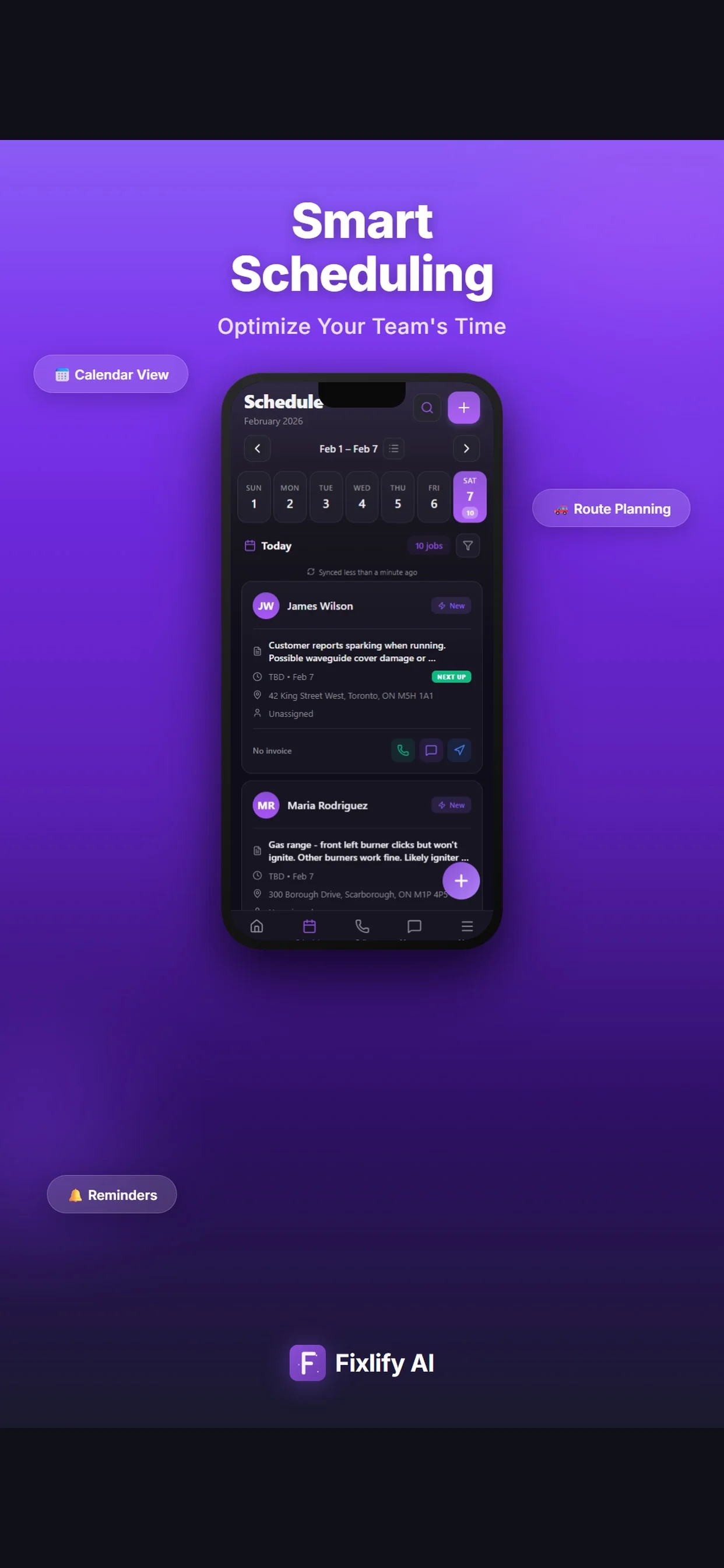
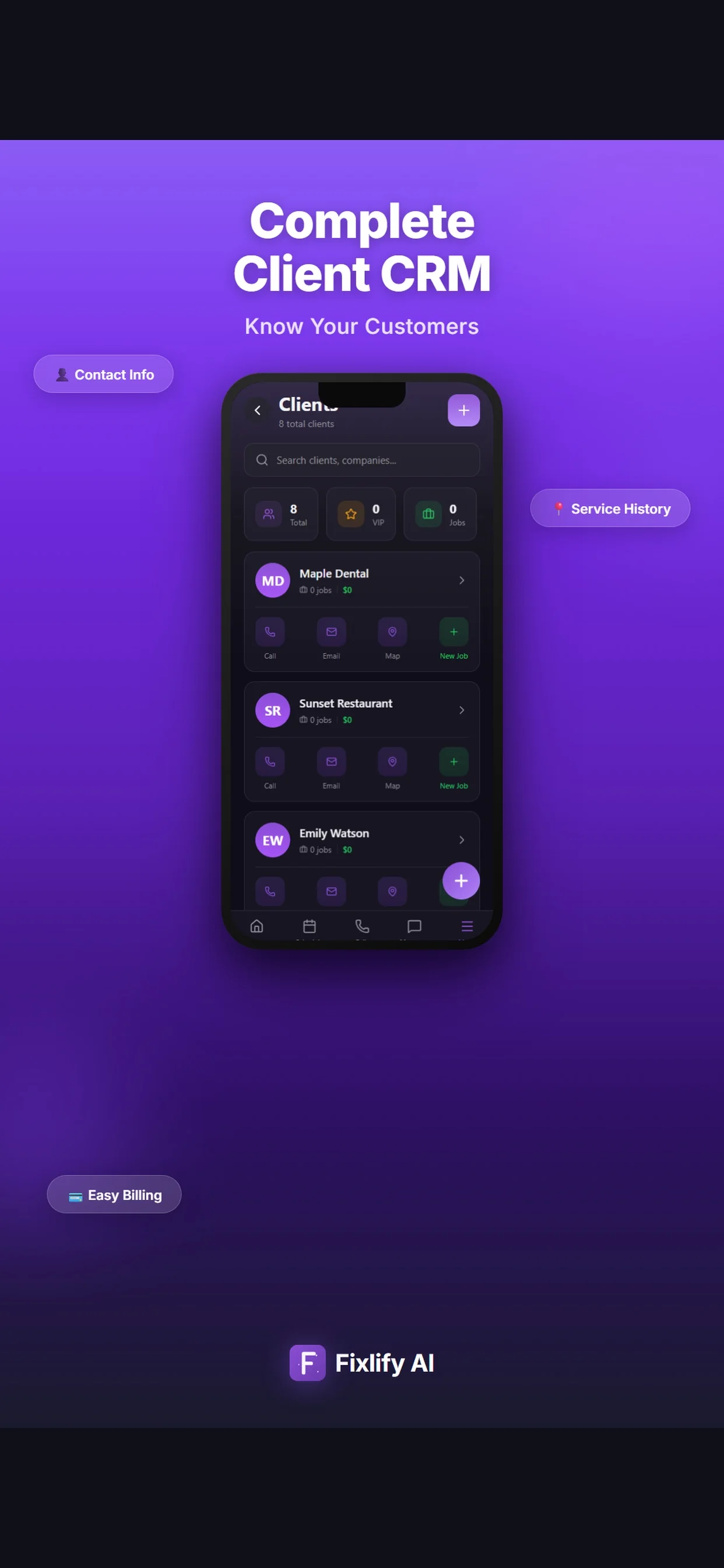
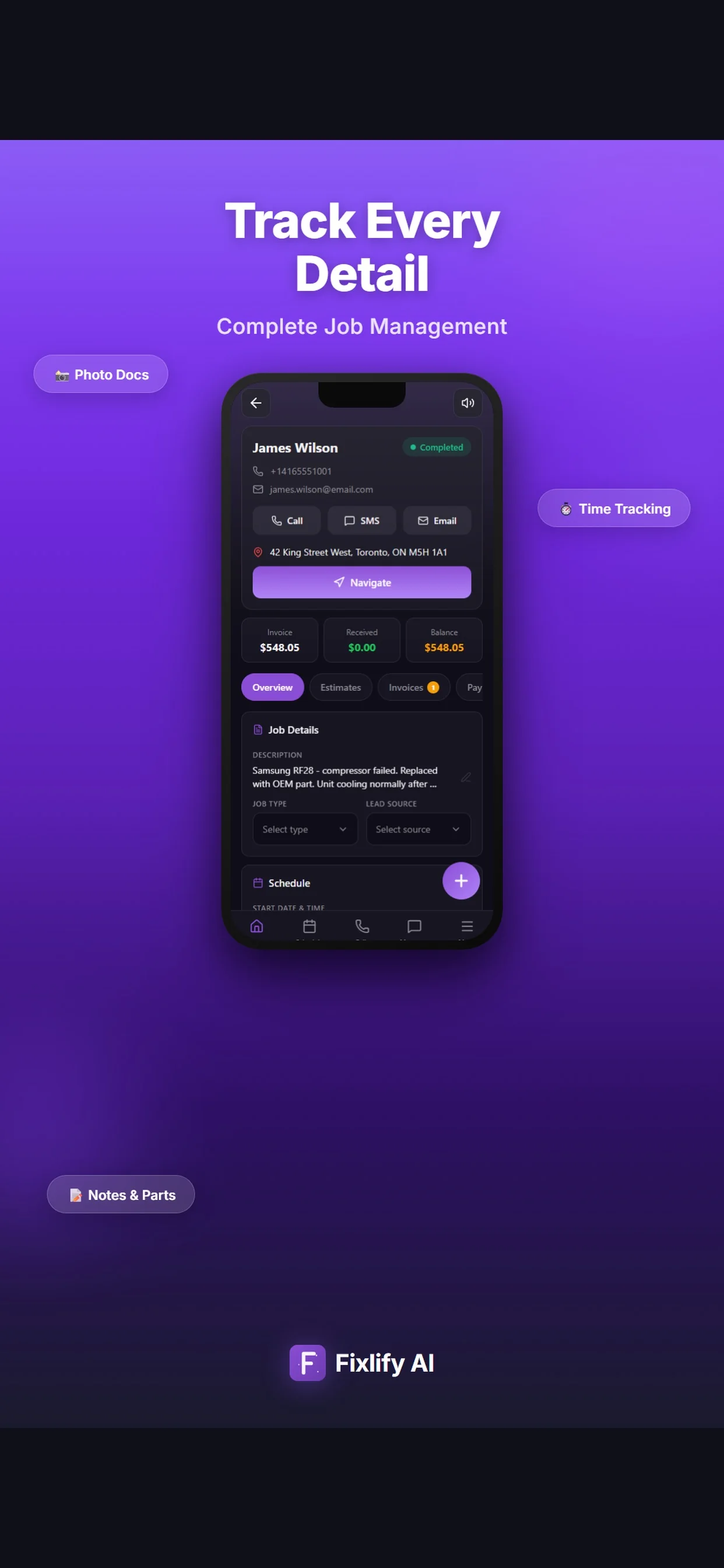
These official App Store images show current customer, job, and schedule screens. They demonstrate where a landscaping team can review assigned work and customer context. The listing uses sample data; available actions depend on workspace configuration and permissions.

Official App Store listing screenshots · captured August 25, 2026 · View the official listing

Official Fixlify iOS App Store image showing the field service client list
Client list with contact actions, job count, and a path to related work.
Official Fixlify iOS App Store image showing a field service job record
Job details connecting the customer, address, notes, schedule, and invoice balance.
Official Fixlify iOS App Store image showing the technician schedule
Schedule view with dated jobs, assignment state, and customer contact actions.

Buyer checklist

Eight Tests for Landscaping Business Software

Run these tests in the exact plan, region, devices, roles, phone setup, accounting process, and team size you intend to use. Create anonymized but representative customers, properties, appointments, field records, estimates, and invoices. Write the expected result first so a polished demo cannot replace operational evidence.

Reproduce a complete property request

List each entry point and handoff from inquiry through property match, qualification, job, schedule, field visit, estimate, approval, invoice, payment, and follow-up. Separate customer-reported conditions from inspected and approved scope.

Test it: Submit a new cleanup request and a returning-customer irrigation report. Capture addresses, contacts, access, reported work, preferred windows, an unsupported request, notes, photos, job records, appointments, assignments, estimate revisions, invoices, payment status, and every role's view.

Test one customer with several properties

Customer-level billing and communication can conflict with location-level contacts, access, tax, service history, and instructions. Define where each detail belongs and who can view or edit it.

Test it: Create three properties for one account with different contacts and instructions. Schedule work at two addresses, revise one property note, reassign one visit, prepare separate and combined billing examples, export the data, and confirm no detail appears on the wrong job.

Break a recurring plan safely

A recurring label does not prove series behavior. Define frequency, season, holidays, skips, pauses, one-time changes, reassignment, duration, price changes, notifications, invoices, and end dates.

Test it: Build a three-month weekly example, move one holiday visit, skip one occurrence, add a one-time task, replace one assigned person, pause and resume service, change a future price, and inspect every appointment, message, job, invoice, and audit record.

Run a difficult schedule and route day

Route order depends on coordinates, travel data, promised windows, duration, breaks, skills, access, priority, vehicle constraints, and dispatcher judgment. A shorter geometric route can still violate the operating plan.

Test it: Create eight assigned geocoded jobs with two customer windows, an urgent insertion, an absent technician, a cancellation, and one missing coordinate. Generate the suggestion, compare it with expected travel, review each constraint, apply an approved order, reschedule manually, and inspect notifications and history.

Verify field records and weak connectivity

A mobile screen is useful only if the intended user can see the right context, record the right evidence, and recover safely from delayed or failed synchronization. Define privacy and retention before loading customer data.

Test it: On the intended phone, open assigned work, read property notes, change status, add notes, tasks, and photos, record an exception, remove connectivity, retry, reassign the job, and inspect office, field, unauthorized, export, and customer-facing views.

Trace an estimate change into the invoice

Reported work, inspected scope, estimate versions, approvals, added work, partial completion, invoice lines, payments, refunds, and accounting records must reconcile without silent replacement.

Test it: Create a maintenance job with a proposed repair, revise quantities and tax, obtain the intended approval evidence, complete only part, add approved work, create and correct the invoice, record a partial payment and refund, then reconcile every record and permission.

Test phone intake against company policy

AI phone behavior depends on approved knowledge, service area, qualifying questions, allowed appointment actions, credits, consent, escalation, and failure handling. A successful normal call does not establish boundary behavior.

Test it: Call as a new lead, returning customer, out-of-area caller, emergency, unsupported design request, chemical-treatment inquiry, price shopper, reschedule, cancellation, accented speaker, silent caller, and transfer request. Compare transcripts, lead or booking records, credit use, notices, and human escalation with policy.

Price the complete year and exit

Subscription price is one part of cost. Include members, jobs, phone, AI, messages, payments, maps, GPS, measurement, accounting, payroll, storage, support, implementation, migration, training, taxes, renewal, and internal labor.

Test it: Calculate normal and peak months, obtain dated written terms, export customers, properties, jobs, schedules, estimates, invoices, payments, files, users, and history, then simulate migration, failed cutover, rollback, access removal, cancellation, and final reconciliation.
Scope and limits

Landscaping Product and Evidence Boundaries

These boundaries describe the current evaluation scope. They prevent a buyer or search system from treating a general field-service workflow as proof of specialist landscape operations or guaranteed business results.

  • Fixlify assigns a technician or team member to a job. It does not claim a complete multi-person crew entity, crew-capacity optimizer, autonomous assignment, shift planner, payroll, or workforce-compliance system.
  • Route ordering requires at least two assigned jobs with usable coordinates. Fixlify returns a suggested sequence for staff review and application; it does not guarantee an optimal route, arrival time, fuel saving, traffic outcome, or customer-window compliance.
  • Fixlify does not claim live GPS tracking, geofencing, automatic weather monitoring, automatic weather rescheduling, automatic recurring-series management, or unattended route dispatch.
  • Fixlify is not landscape design, CAD, rendering, aerial takeoff, automatic property measurement, plant-library, drainage-design, irrigation-design, or engineering software.
  • Fixlify is not represented as a specialist chemical-application, pesticide-compliance, inspection, snow-contract, equipment-maintenance, inventory, purchasing, subcontractor, production-rate, or landscape job-costing system.
  • QuickBooks is currently marked coming soon. Buyers must verify the released accounting export, import, or manual handoff and reconcile estimates, invoices, payments, taxes, fees, refunds, and corrections.
  • A working Fixlify phone number requires a paid plan and 70 credits per month before calls. Phone and AI activity consumes additional credits, and configured intake remains subject to business rules, escalation, consent, region, and testing.
  • No setup time, route saving, capacity increase, fewer missed calls, faster payment, conversion, revenue, profit, ranking, or return on investment is promised. Measure the baseline and run a representative pilot under the required safety, privacy, licensing, chemical, environmental, employment, tax, and contract rules.

For the people doing the work

One system, three views of the same job

A small team does not need three disconnected tools. Each person needs the part of the same customer record that helps them move the work forward.

Landscaping owner-operator

Run customer work from one operating history

Keep new inquiries, returning properties, appointments, field details, estimates, invoices, and follow-up connected while the owner still controls scope, route, price, and customer promises.

  • Review calls and requests with the correct property history
  • Schedule and assign maintenance, repair, or cleanup visits
  • Connect inspected additions with customer approval and billing

Dispatcher or office coordinator

Coordinate changing appointments and assignments

See requested work, customer windows, assigned people, job status, and property notes before changing the day. Use route suggestions as a proposal and verify customer promises, travel, access, skills, and capacity manually.

  • Place jobs after checking availability and site constraints
  • Review and apply a suggested order for eligible assigned jobs
  • Keep reschedules, field updates, and billing follow-up connected

Field technician or team member

Carry current job context into the field

Open assigned work with the customer and property context the company chooses to expose, then add status, notes, photos, tasks, and timing evidence for office review.

  • Read approved property and visit instructions
  • Record inspected conditions and completed-work evidence
  • Return exceptions, follow-up needs, and estimate context to the office

For teams of 1–10

Evaluate it for small landscaping and lawn-care teams

Fixlify gives a small service team a shared request-to-invoice workspace with published plan limits, configurable phone intake, mobile field records, and a reviewed route-order suggestion. Use a representative pilot to decide whether released behavior matches the business.

Review plan limits and pricing
  • You manage lawn care, landscape maintenance, irrigation service, seasonal visits, cleanups, or smaller repair and installation jobs
  • Your team needs customer and property context connected to appointments and assigned people
  • You want calls, field records, estimates, invoices, and payment status in one workflow
  • You can review route suggestions and customer schedule changes instead of requiring unattended optimization
  • You have documented recurring, chemical, measurement, costing, inventory, equipment, payroll, accounting, contract, and compliance requirements

Questions before you start

Landscaping software FAQ

Straight answers for owners deciding whether a connected job workflow fits their business.

What does landscaping business software manage?

Landscaping business software can connect customers, properties, requests, jobs, appointments, assigned team members, field notes, photos, tasks, estimates, invoices, and payment status. Products differ on recurring routes, GPS, weather, measurements, chemical records, production estimating, job costing, inventory, equipment, payroll, accounting, contracts, and multi-branch controls, so test the exact plan.

Is landscaping business software different from landscape design software?

Yes. Business software manages the commercial and field-service workflow. Landscape design software focuses on plans, CAD, planting libraries, 2D or 3D visualization, rendering, and sometimes takeoff. Fixlify does not claim landscape design, automated property measurement, or CAD capability.

Can Fixlify schedule landscaping and lawn-care jobs?

Fixlify supports appointments and assignment of a technician or team member to a job. Test working hours, duration, overlap, service areas, skill requirements, multi-person work, recurring exceptions, rescheduling, notifications, and audit history with your real process. Fixlify does not claim autonomous crew scheduling.

Does Fixlify optimize landscaping routes?

When at least two assigned jobs have usable coordinates, Fixlify can calculate a suggested visit order using a configured travel matrix or a distance fallback. The suggestion is reviewed and applied by staff. It is not a guarantee of the optimal route, arrival time, fuel saving, traffic outcome, or customer-window compliance, and it is not live GPS tracking or geofencing.

Can landscaping software handle recurring lawn-care routes?

Some specialist products publish recurring jobs and route programs, but rules differ for holidays, skips, pauses, one-time changes, reassignment, pricing, notifications, invoicing, and end dates. Fixlify does not claim automatic recurring-series management on this page. Reproduce every required exception before relying on a product.

Can landscaping software reschedule work automatically for weather?

Do not assume it can. Weather source, thresholds, service type, customer promise, route capacity, priority, notices, approval, and audit history all matter. Fixlify does not claim automatic weather monitoring or rescheduling. Staff must decide whether and how a job moves.

Can field staff add landscaping notes and photos?

Fixlify supports mobile access to assigned work and job-linked status, notes, photos, tasks, and timestamps. Test actual devices, roles, privacy, file sizes, weak connectivity, reassignment, supervisor review, export, and customer-facing output. It is not represented as full offline operation or a specialist chemical, inspection, or compliance record system.

Can AI answer calls for a landscaping business?

Configured Fixlify AI phone intake can use approved business information, service questions, hours, service area, allowed appointment actions, and escalation rules. A working number requires a paid plan and 70 credits per month before calls, and phone and AI use consumes more credits. Test emergencies, unsupported services, price requests, reschedules, cancellations, consent, language, and human transfer.

Does Fixlify landscaping software connect to QuickBooks?

QuickBooks is currently marked coming soon in Fixlify, so do not assume automatic synchronization. Confirm the released export, import, or manual handoff for customers, services, estimates, invoices, payments, taxes, fees, refunds, and corrections. Reconcile representative transactions before changing the accounting process.

Your next landscaping job

Start with the work already on your schedule.

Create the customer, schedule the job, and keep the estimate and invoice connected. Start with 50 one-time AI credits and no card.

Run your next job in Fixlify
No credit cardNo contractCancel anytime

Optional analytics

Help us improve the site. We exclude form text and contact details. Privacy policy